For online visibility, every second matters. We know that even a small delay can significantly increase bounce rates and break visitor trust. This can be one of the main reasons why WordPress site owners find it an annoying, long, and frustrating search for a good hosting solution.
There are different factors that determine the migration journey, and it usually starts with a few steps. The first one is load times, and that’s followed by unpredictable performance under load, and on top of it all, the support system that, you know, walks you through the process. Submitting tickets and receiving unhelpful advice isn’t an uncommon situation for WordPress owners.
To test the whole process out, we’re reviewing WPX hosting as one of the options on the market to make things easier for you and clear for all of us. They specialize in WordPress hosting and have a reputation for high speed plus customer-centricity. The angle we decided to take is a detailed, experience-based analysis of how WPX changed performance and made the workflow a lot simpler.
In this review, we will break down and address a few specific points.
- Before and after performance – this includes seeing how WPX influenced CWV (Core Web Vitals)
- WPX support – this section includes how the support team matched expectations and how responsive and helpful their advice was
- Real speed impact – this is beyond simple tests and checks to see how noticeable changes appear in site responsiveness and load times.
CWV (Core Web Vitals) Before vs After WPX Hosting
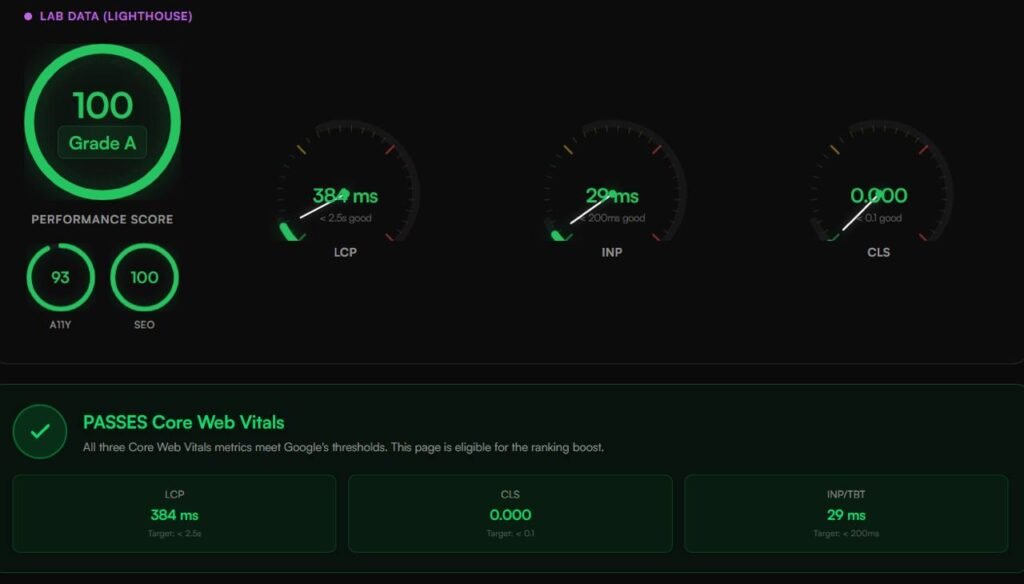
First, in order to evaluate the impact of switching to WPX hosting, we ran a lab test using standard testing setups. The main reason for this was to see how server responsiveness and asset delivery in caching mechanisms impact CWV metrics. Our results show how hosting infrastructure directly affects site speed, user experience, and especially search optimization readiness.
| Metric | Before WPX (Previous Host) | After WPX | Google Target Threshold | Status |
| Performance Score | 92 / 100 | 100 / 100 (Grade A) | 90 – 100 | Pass |
| Largest Contentful Paint (LCP) | 1.8s (1,800 ms) | 767 ms | Under 2.5s (2,500 ms) | Good |
| Interaction to Next Paint (INP) | 68 ms | 16 ms | Under 200 ms | Good |
| Cumulative Layout Shift (CLS) | 0.025 | 0.000 | Under 0.1 | Good |
| Accessibility (A11Y) | 96 | 100 | 90 – 100 | Good |
| SEO Score | 88 | 91 | 90 – 100 | Good |
This data alone might give you a general idea about how well WPX performed, but let’s break it down so that the results become tangible and even more understandable.
1. LCP (Largest Contentful Paint) – 767ms
LCP is meant to show how long it takes for the largest visible element on your page to load. For Google, anything under 2.5 seconds is good. Obviously, since the results show 767 ms, the page loaded well under a single second. On standard budget shared hosting, LCP can often bounce around somewhere between 2.5 and 4 seconds due to high server response latency (TTFB).
2. Interaction to next paint (INP/ TBT) – 16ms
INP is another metric that measures how quickly a browser responds when somebody clicks, taps, or interacts with your page. When Google’s standard is 200 ms, a score that we see with WPX is 16ms. This is a very low delay that allows the server to process backend PHP requests without blocking the browser thread.
3. Cumulative layout shift (CLS) – 0.000
Finally, CLS measures the stability of your website’s text, buttons, or images, and it checks whether they jump around while the page loads. Our scores with WPX show zero movement. This is because the hosting’s fast style sheets and immediate image rendering from the server keep elements locked in place from the second that the loading begins.
Support Team and Walkthrough in The Process
For many website owners and especially the beginners and those who just set up a new website the most daunting process might not be changing hosts or picking a plan but actually having to deal with the stress of moving files migrating problems that might arise during the process and also having to delay the process again and again. and this bring new problems with them because then you have broken pages, or worse you have lost some Revenue and the SEO rankings come down.
WPX is known for prioritizing its support system, and it is one of their selling points, which shows up as a result of our review. Unlike many hosts that can use automated migration plugins that can create their own problems, WPX gives you unlimited manual site migrations very quickly, in under 24 hours.
There’s also no downtime during the transfer because the team working for WPX handles the process behind the scenes for you. This is very important because your site stays active on the old host while the team behind the scenes works on the files, copies databases, and handles the main work, all without causing any problems.
For us, the migration process was very smooth, and it took around 3 hours to complete. After submitting all the necessary information in the morning and before mid-afternoon, we already received an email confirming that everything had been done for us and was successful.
The migration process was entirely handled by the WPX migration team. After we submitted our request, the team confirmed our ticket and laid out the safety guidelines to protect site data. For us, the process took only 3 hours, and the team confirmed the transfer was complete, providing exact DNS records alongside and offering to handle domain registrar setup for us at no charge.
With plugins and AI, an issue might arise, but WPX has human WordPress experts ready to manage the move in any potential plugin conflicts or broken paths. They flag these issues and manually fix them during staging before DNS records.
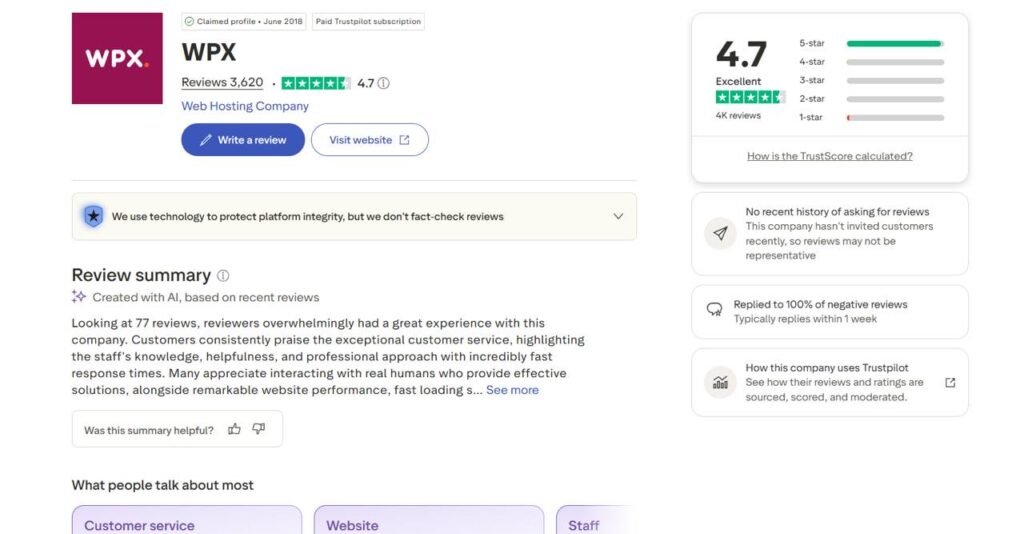
As we mentioned, you can complete most site migrations within 24 hours. Yet again, this is extremely important for those who are just starting out and need these complicated processes done for them, or those who are managing advanced and a lot more complicated websites and would like to take this pressure off their shoulders.
Live chat support is also extremely active. WPX makes sure that any problems that occur can be solved or at least addressed very quickly, so chat agents consistently connect with you within 30 seconds and will be in touch with you if needed. They walk you through your problems and break down the process for you.

And of course, you don’t choose when the problems arise, which is why the availability of support is also very important. WPX is there 24/7, no matter when you’re dealing with those issues, whether it’s late at night or over the weekend; real-time technical support is always there for you.
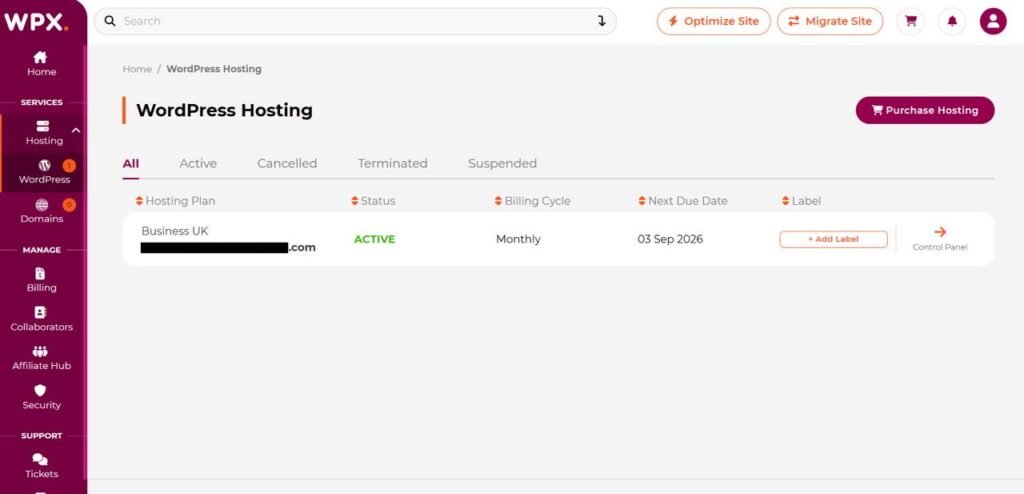
And finally, let’s talk about the ease of use, and as you can see, it is much different from the bloated cPanel systems. It is a much more modern, custom-built control panel which is designed for a minimalistic look and for Simplicity. It is there to complete the tasks that it’s made to do, such as adding domains, installing SSL certificates, and more, which are all visible and ready for your use.
The good thing about this is that it also includes a one-click staging environment, which means you can test updates before publishing them and pushing them live. This also allows you to check the mobile optimization so you can easily manage your sites on the go.
Plans, Pricing and Value
Compared to the other hosting services available for WordPress, WPX’s entry point is accessible. Its true value is in the server resources, performance speed, and whatever comes in extra with whatever plan you choose to work with.
If you prefer testing WPX on a monthly billing cycle before locking in a multi-year term, WPX currently offers a massive 79% off discount on your first month for standard WordPress hosting plans using the promo code SAVE79.
- Starter Plan: Drops from $17.99 to ~$3.78 for Month 1
- Business Plan: Drops from $29.99 to ~$6.30 for Month 1
- Professional Plan: Drops from $59.99 to $12.60 for Month 1
Now let’s break down all the hosting solutions that WPX provides.
For WordPress Hosting
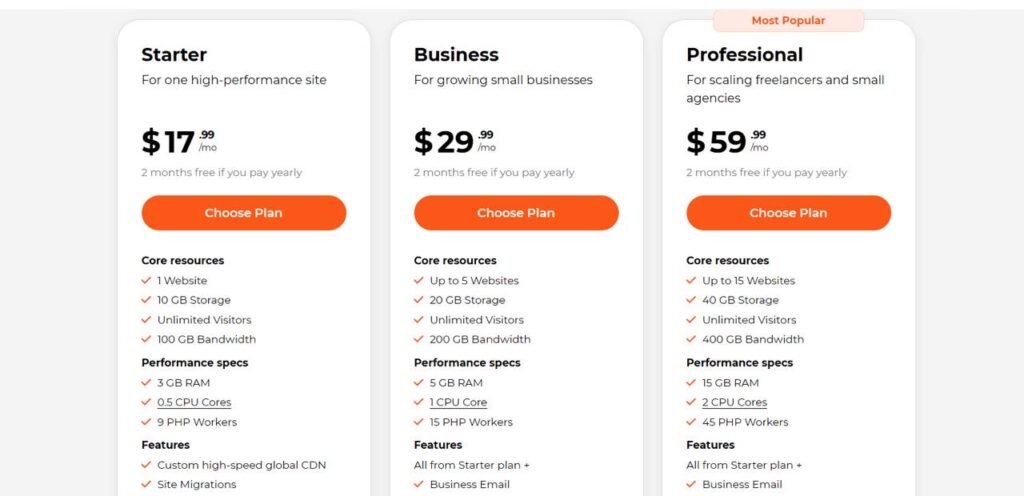
Monthly plan
WPX, as you can see, explicitly details hardware allocations. Every tier includes the most essential security and optimization tools that in other cases would require extra paid plugins.
It also comes with free malware scanning and actual malware removal, which, as we mentioned, would usually require extra paid plugins, somewhere around 100 to 250 a year, but in this case you get it with your plan, which is free.
For professional and business plans, you can see that there are even email features such as Webmail access, unlimited mailboxes, free email migrations, AI-powered email protection, and temporary staging URLs. Features that the hosting company decided to add in case you wanted to purchase a higher plan.
To make long-term hosting more affordable, WPX includes a billing term selector right on their pricing table. Users can switch seamlessly between standard monthly billing and multi-year plans ranging from 1 to 5 years.
| Billing Commitment | Bonus / Free Time Included | Effective Discount |
| 1 Year | 2 Months Free | Save 17% |
| 2 Years | 5 Months Free | Save 21% |
| 3 Years | 11 Months Free | Save 31% |
| 4 Years | 15 Months Free | Save 31% |
| 5 Years | 20 Months Free | Save 33% |
For Agency Hosting
Those with high volume with agencies and/or enterprise portfolios managing client in environments at a big scale you might want to look into agency hosting options. The tires with a certain amount of months you can get it free depending on your commitment still apply in this hosting option.
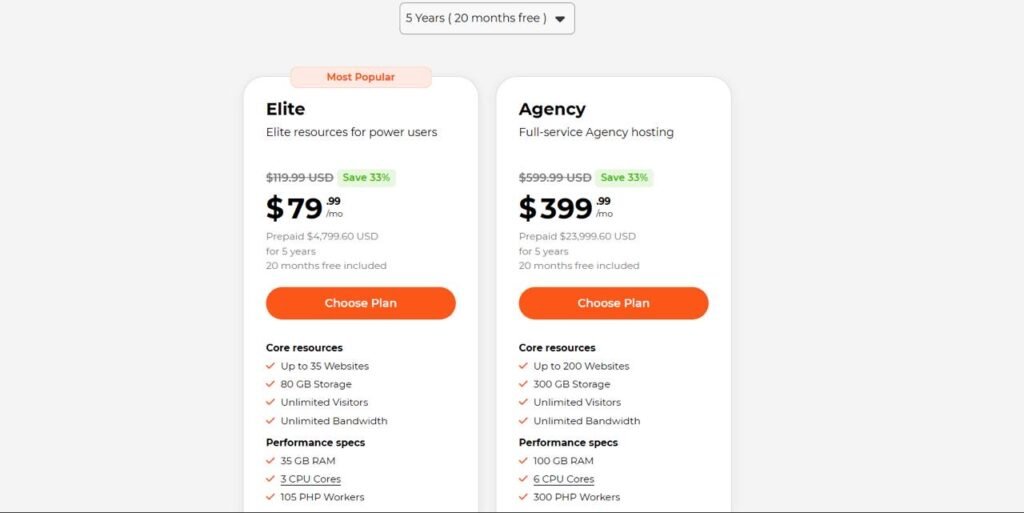
5 years (20 months free)
- Elite Plan: $119.99/monthly gives you – Up to 35 Websites, 80 GB Storage, Unlimited Bandwidth, 35 GB RAM, 3 CPU Cores, 105 PHP Workers
- Agency Plan: $599.99/monthly you’ll get – Up to 200 Websites, 300 GB Storage, Unlimited Bandwidth, 100 GB RAM, 6 CPU Cores, 300 PHP Workers
For Woocommerce Hosting
This one is specifically for e-commerce stores that requires server RAM dynamic database performance and isolated PHP workers in order to process checkout transactions under heavy traffic.
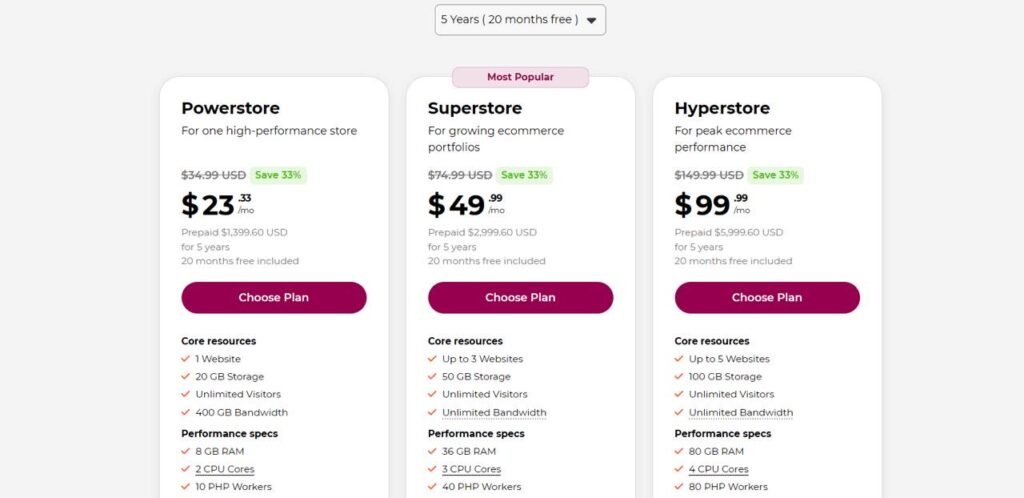
5 years (20 months free)
- Powerstore: $34.99/montly – 1 Website, 20 GB Storage, 400 GB Bandwidth, 8 GB RAM, 2 CPU Cores, 10 PHP Workers
- Superstore: $74.99/montly – Up to 3 Websites, 50 GB Storage, Unlimited Bandwidth, 36 GB RAM, 3 CPU Cores, 40 PHP Workers
- Hyperstore: $149.99/montly – Up to 5 Websites, 100 GB Storage, Unlimited Bandwidth, 80 GB RAM, 4 CPU Cores, 80 PHP Workers
For the final verdict, if you’re a growing business website, an e-commerce website, or an agency managing client portfolios, WPX is quite literally built for you. Not only does it offer features, but the pricing is very cost-efficient compared to any other WordPress hosting service available in the market. You get unlimited migrations, malware cleanups, multi-site support, and all of that with no hidden fees or anything extra, which saves you significant money as well as time.
Conclusion
Whatever hosting you choose, it all comes down to the cost of ownership and what you get for the value of your money. If you stumble across budget hosts that can look attractive at first sight, make sure that they don’t come with hidden fees, security add-ons, and hours that you might lose on attempting to fix server-level errors yourself. Choose hosting that is transparent about their operating system and has a technical team that is ready to support you on the journey.
WPX matches all of the features that we mentioned above and all of the expectations that came with it. Some of the things that it also covers include daily backups with 28-day retention and DDoS protection that gives site owners a level of stability that standard shared environments usually cannot match.
When it comes to deciding which hosting provider is best, we mentioned that it is great both for beginners and those who run more complex sites, but to be more specific, for anyone who’s a business owner, content creator, or agency managing clients, WPX is a reliable backbone for you. If you want to get rid of site management headaches and make sure that your WordPress setup is always up to date, WPX hosting is an investment that proves it’s worth every single day.
Click here for more.