WooCommerce gives store owners the tools to build and manage an online shop, but product discovery can become more difficult as a catalog grows. When a store has hundreds or thousands of products, customers do not always want to browse category pages or navigate through multiple filters. They often know roughly what they want and expect the search bar to help them find it immediately.
This is where a dedicated WooCommerce search plugin can make a difference. Sokol: Smart WooCommerce Search Pro is designed to turn a standard WooCommerce search experience into a faster, more configurable AJAX search system. It provides live product results, SKU search, variation search, search analytics, relevance controls, synonyms, and several other tools aimed at helping shoppers reach the right product with fewer clicks.
In this review, we’ll look at what Sokol Smart Search offers, how the Free and Pro versions differ, and which types of WooCommerce stores can benefit most from it.
What Is Sokol Smart WooCommerce Search?
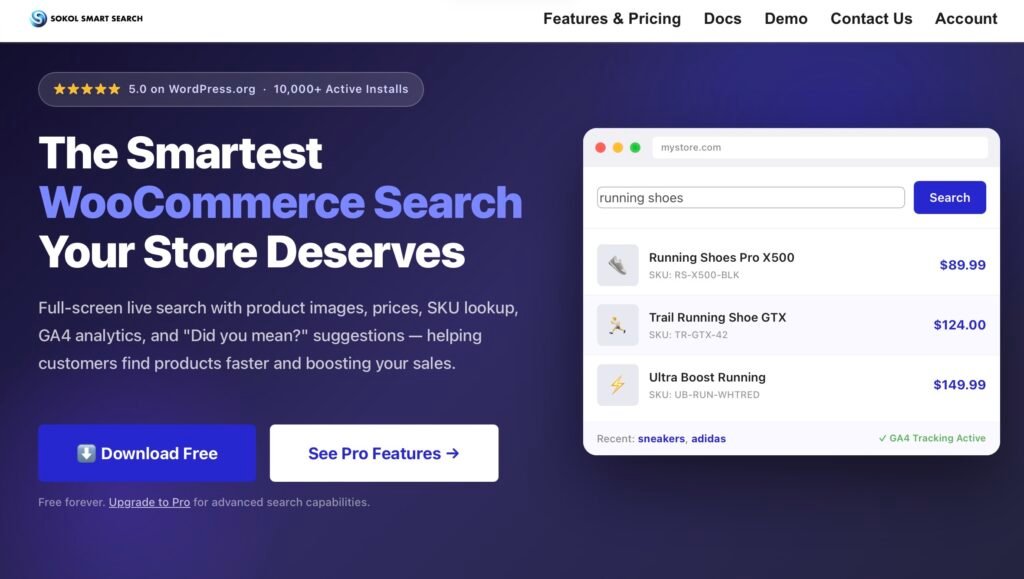
Sokol Smart WooCommerce Search is a search solution built specifically for WooCommerce stores. Rather than waiting for shoppers to submit a search and load a separate results page, it can provide live AJAX results as they type.
The search interface can display product images, names, prices, SKUs, categories, descriptions, and other product information. This gives customers more context before they decide which result to open.
The plugin currently has a free version available through WordPress.org, while the Pro version adds advanced capabilities for stores that need deeper control over their search system. The developer also states that the plugin has more than 10,000 active installations and a 5.0 rating on WordPress.org.
For stores with large catalogs, the biggest idea behind Sokol is simple: make product search faster and more useful instead of treating it as a basic website feature.
Installing and Setting Up Sokol Smart Search
Getting started does not require extensive technical work. According to the plugin’s documentation, you can install the free version from WordPress.org or upload the Pro ZIP file through the WordPress admin area. After activation, the Smart Search settings become available in the dashboard.
One useful aspect of the setup is that you do not necessarily need to replace your existing search bar. Sokol can enhance a default WooCommerce search bar, WordPress search widget, or supported theme search functionality.
Alternatively, you can create a dedicated Smart Search widget and place it where you want it. The plugin also supports Elementor integration and provides a shortcode option for adding a search widget to pages or posts.
This flexibility makes the plugin suitable for both developers who want more control and store owners who prefer a simpler setup.
How the WooCommerce AJAX Product Search Works
The central feature is the WooCommerce AJAX product search experience.
Instead of forcing customers to submit a query and wait for a traditional search results page, Sokol can display matching products while they type. Depending on the configuration, shoppers can see product images, prices, SKUs, categories, and descriptions directly in the results.
The free version already includes several useful search capabilities, including SKU, category, and product-tag searching. It also supports full-screen search, recent searches, product images and prices, and GA4 integration.
This is particularly useful for stores where customers already know what they are looking for. For example, someone shopping for a specific electronic component could enter its SKU rather than manually navigating through several categories.
That makes Sokol more than a visual search enhancement. It can also become a practical navigation tool for customers who shop by product code, brand, category, or other catalog information.
Search by SKU and Product Variations
One of the more useful features for larger and B2B-oriented stores is WooCommerce search by SKU.
SKU searching is available in the free version, meaning store owners do not necessarily have to upgrade simply to allow customers to enter product codes. This can be particularly helpful for wholesale customers, repeat buyers, and businesses selling technical products where SKU numbers are commonly used.
The Pro version goes further with WooCommerce variation search. Customers can search for terms associated with variations, such as colors or sizes, and the search system can surface the relevant products.
Pro also introduces variable-product options inside the search experience. Instead of immediately leaving the search overlay and opening a product page, shoppers can select available variation attributes directly from the search results.
For stores selling clothing, accessories, electronics, furniture, or other products with multiple variations, this can shorten the path between searching and purchasing.
Direct Add to Cart From Search
Another feature worth highlighting is the ability to bring purchasing actions closer to the search experience.
When shoppers find a product, the goal is not simply to show them a result. Ideally, the search process should help them continue toward checkout as quickly as possible. Sokol Pro supports a search experience where products and their relevant options can be presented directly in the search interface.
For stores with straightforward products, this can reduce unnecessary navigation. For variable products, shoppers can first select the appropriate option before proceeding.
This approach is especially useful when customers are already familiar with the catalog and do not need to read an entire product page before purchasing.
Search Analytics: Understand What Customers Want
Search can also provide valuable information about what shoppers want but cannot easily find.
Sokol Pro includes internal search analytics that can show information such as popular queries, searches that return no results, and product interactions.
This makes WooCommerce search analytics useful beyond improving the search box itself.
For example, if customers frequently search for a product name that returns no results, the store owner may discover a naming, categorization, or catalog problem. Similarly, repeated searches for a particular product type can provide insight into customer demand.
The free version also supports GA4 integration for search-event tracking, although the website needs Google Analytics and Google Tag Manager configured for the integration.
For businesses already using analytics, this provides another way to connect search behavior with broader website data.
Relevance Controls, Synonyms, and “Did You Mean?”
Not every customer searches using the exact terminology used in a product catalog.
A customer might search for “couch” while a store uses “sofa” in its product titles. Another customer might simply misspell a product name.
Sokol Pro addresses this through synonyms, spelling corrections, and “Did You Mean?” functionality. Store administrators can create synonym pairs and configure the search system to provide alternative terms when a query does not produce useful results.
The Pro version also includes relevance configuration. This allows store owners to control how different pieces of product information influence search rankings. For example, a store may want title or SKU matches to carry more importance than less relevant product information.
This is one of the features that makes Sokol more interesting for complex catalogs. Instead of simply installing a search box and accepting whatever results WooCommerce produces, administrators have more control over what customers see first.
Searching Custom Fields, Taxonomies, and Attributes
Standard WooCommerce product data is not always enough for specialized stores.
Some stores use custom fields to store information such as material, manufacturer codes, country of origin, technical specifications, or other product details. Sokol Pro can extend search into custom fields, custom post types, and custom taxonomies. It also supports product attributes and brands.
The plugin’s documentation explains that administrators can configure which post types, fields, and taxonomies should be included in the search index. Product SKUs, custom fields, product categories, tags, and custom taxonomies can all be part of the searchable data depending on the configuration and version.
This makes the plugin particularly relevant for medium and large catalogs where products contain more information than just a title and description.
Full-Screen Search and Customization
Search does not have to look like a small dropdown underneath a search field.
Sokol includes a full-screen search mode that can display recent searches, featured products, categories, and other content within an immersive search interface.
The results can also be presented using different layouts. The documentation describes configurable column layouts, including grid-based displays that adapt to different screen sizes.
There are also styling controls for the search field and results popup, including dimensions, borders, colors, and other visual elements.
For designers and agencies, this matters because a search plugin should ideally fit into the existing website instead of looking like an unrelated component.
Sokol is designed to work with a range of WooCommerce themes and page builders, including Elementor, Divi, Avada, and other common WordPress setups.
Free vs Pro: Which Version Do You Need?
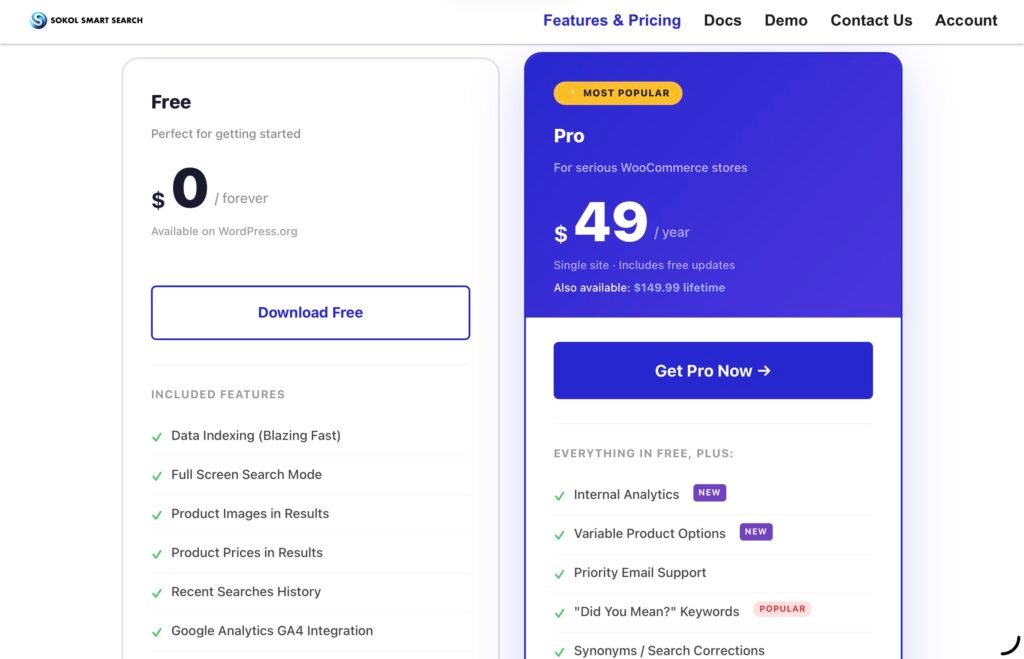
The free version is surprisingly capable for a basic store search upgrade. It includes data indexing, full-screen search, recent searches, images and prices in results, GA4 integration, SKU search, and category and tag searching.
The Pro version is for stores that need more advanced control. It adds internal analytics, variable product options, relevance configuration, synonyms, variation searching, custom post types, custom taxonomies and fields, product attributes and brands, product labels, and stop words.
At the time of writing, the official website lists Pro at $49 per year for a single site, with a $149.99 lifetime option also available. The developer also states that Pro includes a 30-day money-back guarantee.
Final Verdict
A good search experience can become increasingly important as a WooCommerce store grows. Customers should not have to understand a store’s category structure or exact product naming conventions just to find something they already know they want.
Sokol Smart WooCommerce Search approaches this problem by combining live AJAX search with deeper catalog searching, SKU support, variation search, analytics, relevance controls, synonyms, and customizable presentation.
The free version is a practical starting point for stores that primarily need faster product discovery and features such as SKU search, while Pro becomes more relevant for stores with large catalogs, numerous variations, specialized product data, or a need to analyze and fine-tune customer searches.
Overall, Sokol is best understood not simply as a replacement search box, but as a layer that can make WooCommerce product discovery more structured, flexible, and responsive. For businesses looking to improve WooCommerce search, particularly those dealing with many SKUs or product variations, it provides a broad set of tools without requiring the store’s entire navigation system to be rebuilt.
Click here for more.