Website images can have a major impact on performance. High-resolution photos, product images, graphics, and other visual assets often make up a significant portion of a webpage’s total size. When these files are not properly optimized, they can contribute to slower loading times, higher bandwidth usage, and a less efficient browsing experience, particularly for visitors using mobile connections.
This is where ShortPixel comes in. ShortPixel is an image optimization platform designed to reduce image file sizes while maintaining visual quality. Its tools can compress existing images, automatically optimize new uploads, convert images to modern formats such as WebP and AVIF, and provide adaptive image delivery through its WordPress solutions.
The platform is particularly focused on WordPress users, but it also offers tools and APIs for other types of websites. In this ShortPixel review, we will look at its main features, optimization methods, WordPress integration, pricing, advantages, limitations, and the types of websites that can benefit from it.
What Is ShortPixel?
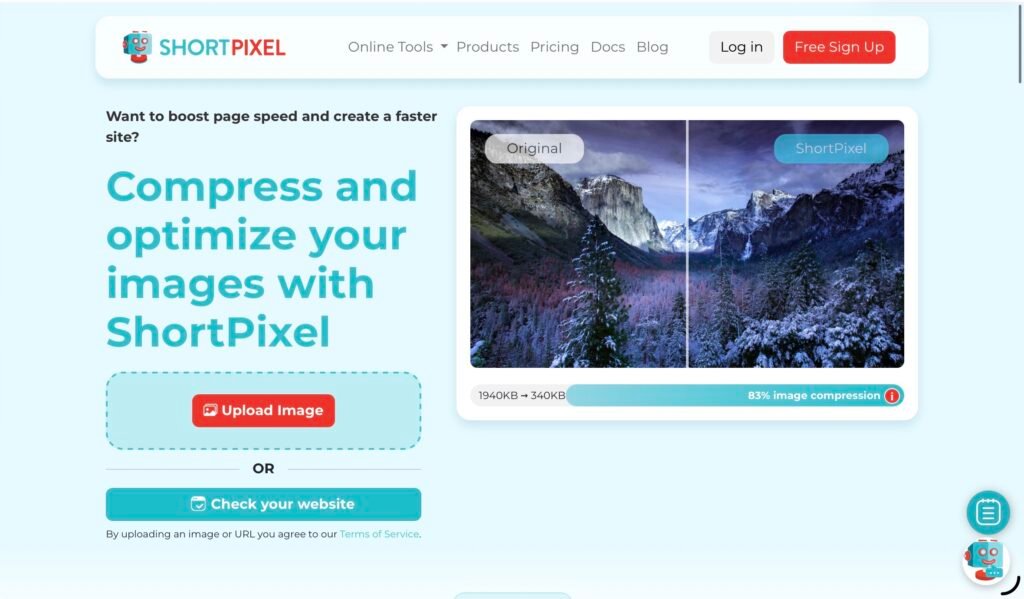
ShortPixel is an image optimization service that helps websites reduce the size of their visual content without requiring users to manually edit every image. Its WordPress Image Optimizer plugin can automatically process images when they are uploaded, while existing images can be optimized in bulk.
According to ShortPixel, its platform has been used by more than 1 million websites and has optimized billions of images. The company focuses on reducing file sizes while preserving the appearance of the original images.
The service supports a broad range of formats, including JPEG, PNG, GIF, and PDF files. It can also generate WebP and AVIF versions of supported images, allowing websites to deliver modern image formats to compatible browsers.
For WordPress users, the main product is the ShortPixel Image Optimizer plugin. There is also a separate ShortPixel Adaptive Images plugin that focuses on serving appropriately sized images according to the visitor’s device and image container.
How Does ShortPixel Work?
ShortPixel is designed to automate much of the image optimization process. With the WordPress plugin installed, uploaded images can be sent to ShortPixel’s optimization cloud, processed using its algorithms, and returned to the site’s Media Library in an optimized form. Existing images can also be processed in bulk.
This approach is useful because image optimization does not necessarily have to become another step in a content publishing workflow. Instead of downloading an image, editing it in separate software, exporting it, checking its size, and then uploading it to WordPress, users can allow ShortPixel to handle the optimization automatically.
The service also provides backup functionality. Original images can be stored locally, allowing users to restore individual files or multiple images if necessary.
This makes the platform particularly practical for websites with large existing media libraries, where manually processing hundreds or thousands of images would be time-consuming.
Image Compression Options
One of ShortPixel’s most important features is its range of compression methods. Users can choose between Lossy, Glossy, and Lossless optimization depending on the type of website and the desired balance between file size and image quality.
Lossy compression generally provides greater file-size reductions, making it useful for websites where loading speed is a major priority. Lossless compression is designed to preserve more of the original image data, which can be preferable when image fidelity is particularly important.
ShortPixel also offers Glossy compression for JPEG images. This option is positioned toward users such as photographers and ecommerce businesses that need to maintain high visual quality while still reducing file sizes.
The platform’s SmartCompress technology is designed to optimize images repeatedly using its algorithms to find a balance between visual quality and file size. Rather than simply applying a fixed compression percentage to every image, ShortPixel’s approach attempts to produce an image that looks close to the original while requiring fewer bytes.
WebP and AVIF Conversion
Modern image formats are another major part of ShortPixel’s feature set. The platform can automatically generate WebP and AVIF versions of JPEG, PNG, and GIF images.
This is useful because websites can provide smaller, modern image files to browsers that support these formats while retaining the original format as a fallback when necessary.
ShortPixel can also use the HTML <picture> element to help deliver next-generation versions on the front end or deliver them directly via .htacces rules or via the built-in CDN. This reduces the need for website owners to manually create separate versions of every image and configure how browsers should receive them.
For websites containing hundreds or thousands of images, automatic format conversion can significantly simplify image management.
Bulk Image Optimization
One of the biggest advantages of ShortPixel for established WordPress websites is bulk optimization.
Rather than requiring users to process every image individually, the plugin can optimize an existing Media Library in bulk. This is particularly useful when a website has been online for several years and contains a large archive of images that were uploaded before an image optimization solution was installed.
ShortPixel also supports background processing, meaning users do not necessarily need to keep a browser tab open while optimization jobs are running. Recurring cron jobs can be configured for websites that continuously receive new images.
For larger websites, WP-CLI support provides another way to manage optimization from the server command line. This can be especially useful for developers and administrators working with large media libraries.
ShortPixel Adaptive Images
ShortPixel’s standard Image Optimizer and its Adaptive Images plugin serve somewhat different purposes.
The Image Optimizer focuses primarily on compressing and converting images. Adaptive Images adds another layer by examining the size of the image container and serving a version that is appropriately scaled for the visitor’s device. The optimized image can then be delivered through a global CDN.
This distinction matters because compression alone does not solve every image-performance problem.
For example, a website might compress a large 3000-pixel image successfully, but if a visitor’s screen only displays that image at 500 pixels wide, sending the much larger version can still result in unnecessary data transfer. Adaptive image delivery addresses this issue by creating and serving versions that better match the actual display requirements.
ShortPixel therefore offers tools for both reducing the size of an image file and making sure visitors receive an appropriately sized version.
Support for WooCommerce and Other WordPress Tools
ShortPixel is also designed to work with websites that have more complex media requirements. The company lists compatibility with WooCommerce, NextGEN Gallery, Modula, Foo Gallery, WP Retina 2x, WPML, WP Offload Media, and other WordPress tools.
This can be particularly valuable for ecommerce websites.
Online stores can contain hundreds or thousands of product images. These images can have a direct effect on the amount of content a visitor needs to load. ShortPixel can optimize thumbnails as well as featured images, while giving users control over which thumbnail sizes should be processed.
The platform also supports Smart Cropping, which uses AI to generate subject-centered thumbnails. This can be useful for ecommerce stores where automatically generated thumbnails need to keep the main subject visible.
Advanced Optimization Controls
ShortPixel provides several controls for users who need more precise optimization rules.
For example, specific images can be excluded based on filenames, paths, sizes, upload dates, or more advanced regular-expression rules. Users can also choose which generated thumbnail sizes should be optimized.
The platform supports images up to 100MB and provides options for managing EXIF metadata. Users can choose whether metadata should be retained or removed, depending on their workflow and privacy requirements.
ShortPixel also supports several less common image workflows, including HEIC files. HEIC images uploaded from devices such as iPhones can be converted to JPG and optimized according to the selected settings.
These features make ShortPixel more flexible than a basic image-compression plugin.
AI-Powered Features
ShortPixel has expanded beyond traditional compression with several AI-based image tools.
Its current WordPress Image Optimizer offering includes AI Image SEO, which can generate alternative text, captions, titles, and image descriptions. It also offers AI image upscaling and AI background removal.
The AI SEO functionality can be useful for websites with large media libraries where manually writing metadata for every image would require considerable time. Meanwhile, background removal and upscaling can be particularly relevant for ecommerce and visual-content websites.
However, these features should be viewed as additions to the core optimization service rather than replacements for human editorial judgment. Automatically generated image descriptions should still be reviewed when accessibility and SEO accuracy are important.
Pricing and Credits
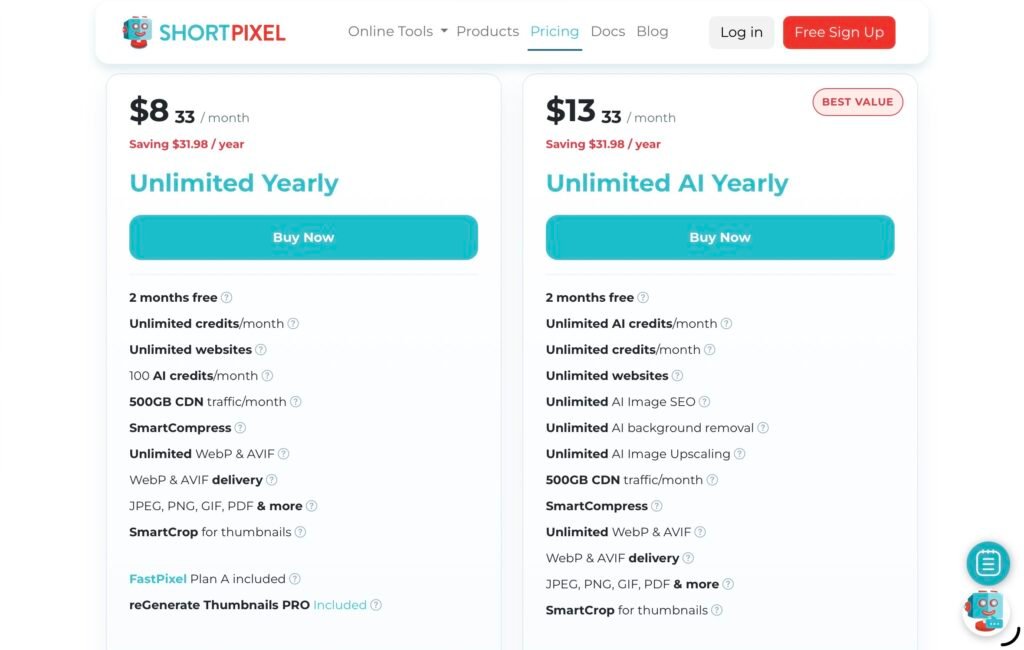
ShortPixel offers both subscription-based and one-time payment options. The company currently provides a free plan as well as paid plans, with the pricing structure designed around image optimization requirements.
The ShortPixel Image Optimizer plugin is available with up to 100 free optimization credits per month. The listed Unlimited plan is $10.99 per month or $8.33 per month when paid yearly.
One important point to understand is how credits work.
ShortPixel generally counts one credit for an image or thumbnail that is optimized. Because WordPress can automatically generate multiple thumbnail sizes for a single uploaded image, one upload may consume multiple credits. Generating WebP or AVIF versions can also require additional credits.
For example, if WordPress generates eight thumbnails from one uploaded image and WebP versions are created for the original and thumbnails, the total credit usage can be significantly higher than simply counting the original upload as one image.
This is worth considering when estimating how many credits a website will require.
The company also offers one-time packages whose credits do not expire, as well as monthly subscriptions with recurring quotas.
Pros and Cons of ShortPixel
Pros
- Automatic image optimization for WordPress
- Lossy, Glossy, and Lossless compression options
- WebP and AVIF conversion
- Bulk optimization for existing media libraries
- Background processing and WP-CLI support
- Adaptive image delivery through a separate plugin
- CDN functionality
- Support for WooCommerce and popular WordPress plugins
- Backup and restoration of original images
- Advanced exclusion rules
- AI-powered image SEO and image editing tools
- Support for HEIC images
- Free plan available
- One-time credit packages are available
- 24/7/365 support according to ShortPixel
Cons
- Credit usage can become more complicated when WordPress generates multiple thumbnails
- WebP and AVIF generation can consume additional credits
- Some advanced functionality is distributed across separate ShortPixel products
- Websites with very large media libraries may need to carefully estimate their credit requirements
Who Should Use ShortPixel?
ShortPixel is particularly well suited to WordPress website owners who rely heavily on visual content.
For bloggers and publishers, it can automate optimization for article images and existing media libraries. For ecommerce websites, it can reduce the size of product images and thumbnails while providing modern formats and additional image-management features.
Agencies can also benefit from ShortPixel’s workflow features. The platform supports API key aliases for agencies, WordPress multisite installations, WP-CLI, and advanced optimization controls.
Photographers and creative websites may prefer the additional control provided by Glossy or Lossless compression, while websites focused primarily on performance can use more aggressive optimization settings.
For non-WordPress websites, ShortPixel also offers a Website Optimizer and API tools, making the platform broader than a WordPress-only plugin.
Final Verdict
ShortPixel is a comprehensive image optimization platform that combines compression, format conversion, responsive image delivery, CDN functionality, and automation. Its WordPress integration makes it particularly convenient for websites where images are uploaded frequently or where an existing Media Library contains a large number of unoptimized files.
Its support for Lossy, Glossy, and Lossless compression gives users control over the quality-versus-size balance, while WebP and AVIF conversion helps modernize image delivery. Features such as bulk optimization, background processing, WP-CLI, advanced exclusions, backups, and WooCommerce compatibility make it suitable for both smaller websites and more demanding WordPress projects.
The main consideration is the credit system. Since WordPress generates multiple thumbnails and next-generation versions can require additional credits, website owners should understand how their particular setup will affect consumption before choosing a plan.
Overall, ShortPixel offers much more than basic image compression. It provides a broader image-performance toolkit that can automate many of the tasks involved in preparing, optimizing, and delivering images on the web.
Click here for more insights.