As cryptocurrency continues to find its place in online commerce, businesses are exploring new ways to accept digital assets without complicating their existing payment processes. For e-commerce merchants, the challenge is not simply accepting cryptocurrency. They also need a reliable way to integrate crypto payments into their stores, monitor transactions, manage payment statuses, and handle the assets they receive.
CCPayment is a cryptocurrency payment gateway designed to help businesses manage these tasks through an integrated payment infrastructure. For online stores built with WordPress and WooCommerce, the platform offers a dedicated plugin that allows merchants to introduce cryptocurrency as a checkout option without developing a custom crypto payment system from scratch.
Rather than replacing an existing e-commerce platform, CCPayment works alongside it, connecting a WooCommerce store to its cryptocurrency payment infrastructure. This approach makes it relevant to merchants who want to expand their payment options while keeping their current storefront and order management processes.
In this review, we will explore CCPayment’s main features, WooCommerce integration, cryptocurrency payment capabilities, transaction management, automatic conversion options, and the factors businesses should consider before adopting the platform.
What Is CCPayment?

CCPayment is a crypto payment gateway that enables businesses to accept, manage, and settle cryptocurrency payments. Its services are designed to connect merchants with customers who prefer paying with digital assets, providing a payment solution that can be integrated into existing business operations.
For e-commerce businesses, one of the platform’s main offerings is its WooCommerce crypto payment plugin. WooCommerce is a widely used e-commerce solution for WordPress, allowing businesses to create online stores and manage products, orders, and checkout experiences. However, accepting cryptocurrency typically requires an additional payment integration.
CCPayment addresses this requirement through a ready-to-use plugin that connects a merchant’s WooCommerce store with CCPayment’s payment infrastructure. Once configured, the gateway can appear as a payment option during checkout, allowing customers to pay with supported cryptocurrencies.
The integration also connects cryptocurrency payment activity with the corresponding WooCommerce order. This helps merchants follow transaction progress through their existing store workflow instead of treating every crypto payment as a completely separate process.
Beyond the plugin, CCPayment offers a merchant platform for payment-related operations, including transaction records, balances, and other account activities. Its e-commerce solution is also relevant to businesses looking for a broader approach to accepting cryptocurrency.
Overall, CCPayment is designed to simplify the operational side of crypto payments, particularly for businesses that want to add digital currencies to an established e-commerce setup.
Key Features of CCPayment
1. Easy WooCommerce Integration
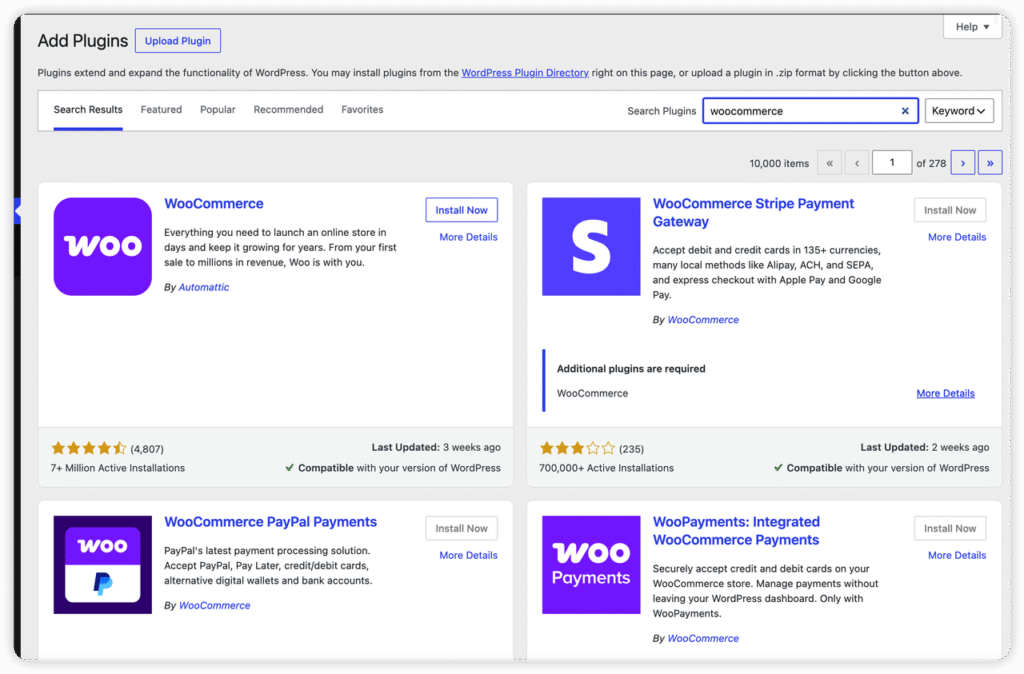
One of CCPayment’s most practical advantages is its dedicated WooCommerce plugin. Instead of building a payment integration independently, merchants can install the plugin and connect their store to a CCPayment merchant account.
Developing a cryptocurrency payment system from scratch can involve significant technical work. Businesses may need to connect to blockchain networks, generate payment instructions, monitor incoming transactions, and ensure that payment updates correspond to the right orders. A ready-made gateway helps reduce the amount of custom development required for these tasks.
For WooCommerce store owners, the plugin provides a more direct way to introduce cryptocurrency payments into an existing checkout environment. Merchants can continue using WooCommerce to manage their products and orders while CCPayment handles the connected crypto payment flow.
This setup may be particularly useful for small and medium-sized businesses that want to experiment with cryptocurrency payments without allocating extensive development resources to a custom integration.
However, installing the plugin is only one part of the process. Merchants should also review the current setup requirements, configure their CCPayment account, and test payment and order-status behavior before making the gateway available to customers.
2. Multi-Currency and Multi-Chain Payments
Cryptocurrency users do not all rely on the same digital assets or blockchain networks. Some prefer established cryptocurrencies, while others use stablecoins or assets available across different networks. A payment gateway that supports multiple options can therefore make a crypto checkout more accessible to a broader customer base.
CCPayment supports 900+ cryptocurrencies across 100+ blockchain networks through its payment infrastructure. For WooCommerce merchants, this means they can potentially offer different crypto payment options without developing a separate checkout connection for every supported asset.
This approach can simplify payment infrastructure and give customers more flexibility when choosing how to pay.
Multi-currency support may also be valuable for businesses serving international audiences. Customers in different markets can have different preferences regarding digital assets, so providing several supported payment options may help accommodate those preferences.
Nevertheless, the exact range of available currencies and networks matters. Merchants should consult CCPayment’s official website and current documentation to confirm which assets are supported, whether specific networks are available for each asset, and what limitations apply. Support for a particular cryptocurrency should not automatically be interpreted as support for every blockchain on which that cryptocurrency exists.
Ultimately, the usefulness of this feature depends on whether CCPayment supports the assets and networks relevant to a merchant’s target customers.
3. Integrated Cryptocurrency Checkout
A crypto payment option is most useful when customers can access it naturally within the existing purchasing process. CCPayment integrates with WooCommerce to make cryptocurrency available as a payment method within the store’s checkout flow.
After the gateway has been configured, customers can select the crypto payment option and proceed through CCPayment’s payment process. This creates a connection between the storefront where the customer places an order and the infrastructure used to process the cryptocurrency payment.
The advantage is that merchants do not have to create an entirely separate checkout experience solely for crypto users. Instead, cryptocurrency becomes another payment option within the broader e-commerce process.
This can be particularly helpful for stores whose customers already use digital assets for online purchases. It also allows merchants to explore cryptocurrency acceptance while retaining their existing WooCommerce storefront.
The customer experience still depends on several factors, including the payment instructions provided, the supported currency and network, the time required for payment confirmation, and the clarity of any status updates. Merchants should test the complete checkout process on desktop and mobile devices to ensure that customers understand how to complete a transaction.
A smooth checkout is not determined by the availability of a payment option alone. Clear instructions and reliable status updates are equally important for reducing confusion and abandoned purchases.
4. Payment Status and WooCommerce Order Management
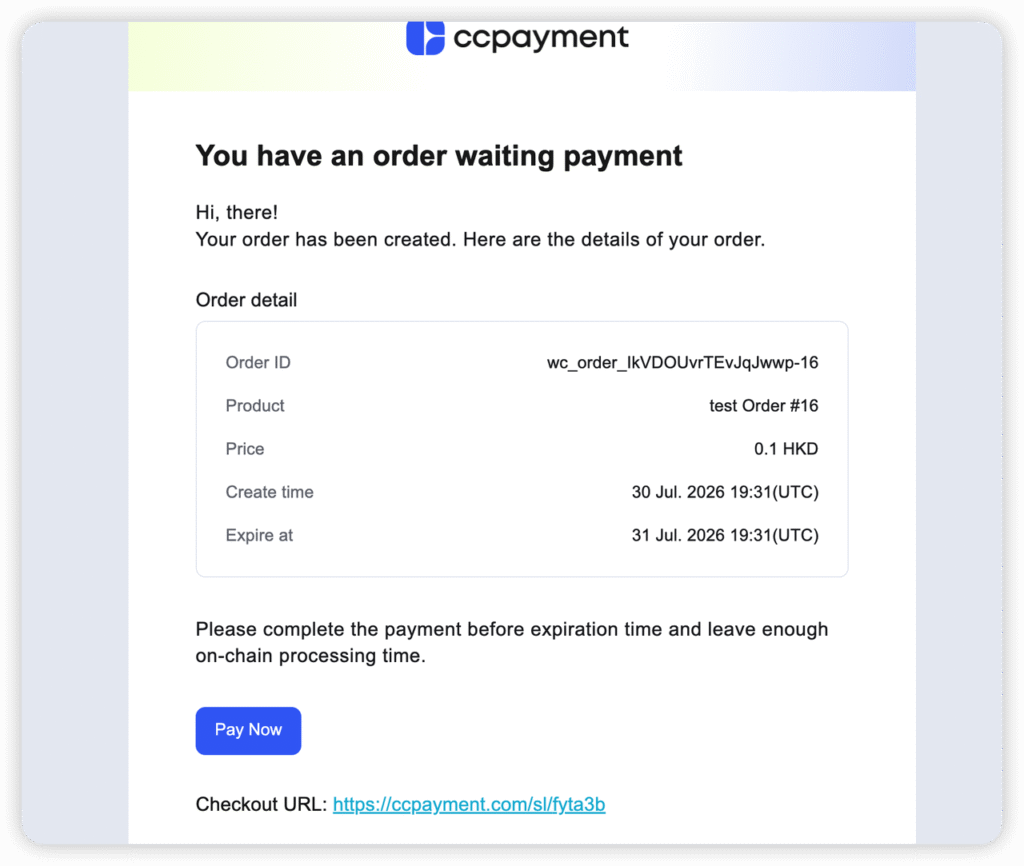
Managing orders is an essential part of running an online store, and cryptocurrency payments introduce additional details that merchants must monitor. A customer may initiate a transaction, but the store still needs to know when the payment has been processed and how it relates to the original order.
CCPayment’s WooCommerce plugin includes real-time payment-status updates, helping merchants follow transactions and their associated checkout activity. This connection can reduce the need to check blockchain transactions manually and update order records independently.
For example, when a customer purchases a product using a supported cryptocurrency, the merchant needs a clear way to determine whether the payment has been received and whether the order can proceed to fulfillment. Connecting payment information with WooCommerce orders helps bring these activities into a more consistent workflow.
This feature can be especially useful for stores that process numerous orders or serve customers across different markets. Keeping payment information connected to order records can make daily operations more manageable and help merchants investigate discrepancies when they occur.
However, merchants should distinguish between a transaction being initiated, a payment being detected, and a payment reaching the required confirmation status. They should also test how the plugin handles incomplete payments, expired payment requests, and other exceptional situations before accepting live transactions.
5. Automatic Conversion and Withdrawal
Accepting cryptocurrency can introduce an additional financial consideration: market volatility. The value of some digital assets can change significantly, meaning that the value of a payment received today may differ by the time a merchant decides to exchange or use it.
CCPayment offers automatic conversion capabilities that can help businesses manage this exposure. According to the official WooCommerce plugin listing, the integration supports automatic conversion into stablecoins, which may help merchants reduce their exposure to fluctuations in the prices of more volatile cryptocurrencies. The plugin also lists automatic withdrawals to a designated address as a supported feature.
Merchants can use automatic conversion to manage supported incoming crypto payments according to their preferred asset configuration, while automatic withdrawals can transfer funds to a designated address. Before enabling these features, merchants should review the supported assets, applicable fees, conversion rules, and withdrawal settings.
6. Merchant Payment Management
The WooCommerce plugin is only one part of the CCPayment offering. The broader merchant platform provides tools for managing payment records, balances, transactions, and related account operations.
Having a dedicated place to review payment activity is important for businesses that want visibility into their cryptocurrency revenue. Rather than relying exclusively on individual blockchain explorers or manually maintained spreadsheets, merchants can use the platform’s available management features to monitor relevant transaction information.
This can help businesses review incoming payments, understand their available balances, and organize payment-related activities. Depending on the merchant’s configuration and the functionality available to its account, the wider platform may also support additional operations such as conversion and withdrawals.
For stores with multiple payment methods, this separation of responsibilities can be useful: WooCommerce remains the primary environment for managing products and customer orders, while CCPayment provides the infrastructure for cryptocurrency transactions and associated asset management.
Merchants should still establish appropriate accounting and reconciliation procedures. A payment gateway can make transaction information easier to access, but businesses remain responsible for maintaining accurate financial records and meeting their tax and reporting obligations.
How to Set Up CCPayment for WooCommerce
CCPayment’s plugin is intended to make cryptocurrency integration accessible without requiring merchants to develop their own payment infrastructure. The official WordPress plugin listing describes a setup process involving account registration, website verification, plugin installation, and configuration.
The general process is as follows:
Step 1: Create a CCPayment account. Register through the official CCPayment website and complete the applicable account setup and website verification requirements.
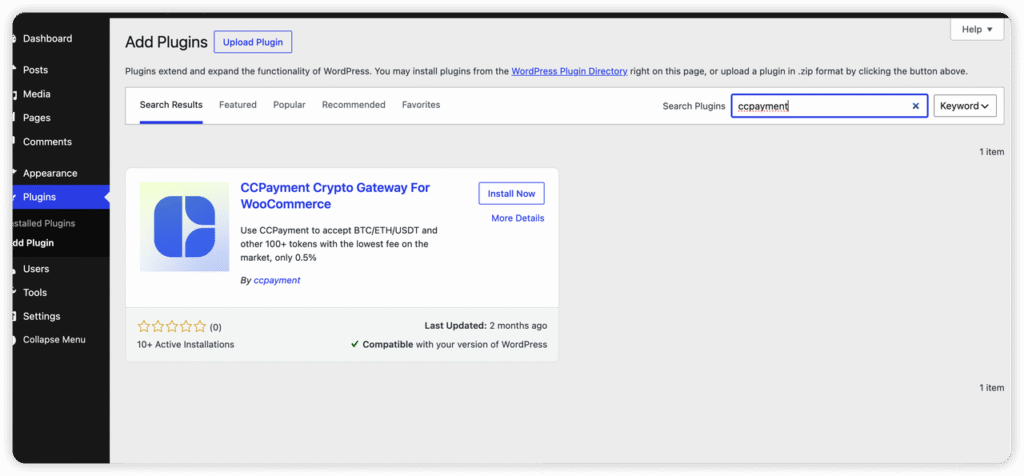
Step 2: Install the WooCommerce plugin. Find the official CCPayment Crypto Gateway for WooCommerce listing in the WordPress plugin directory. Install and activate the plugin through the WordPress administration dashboard.
Step 3: Configure the payment gateway. Open the WooCommerce payment settings and locate the CCPayment gateway. Enter the required merchant credentials, including the Merchant APP ID and APP Secret, according to the plugin’s instructions.
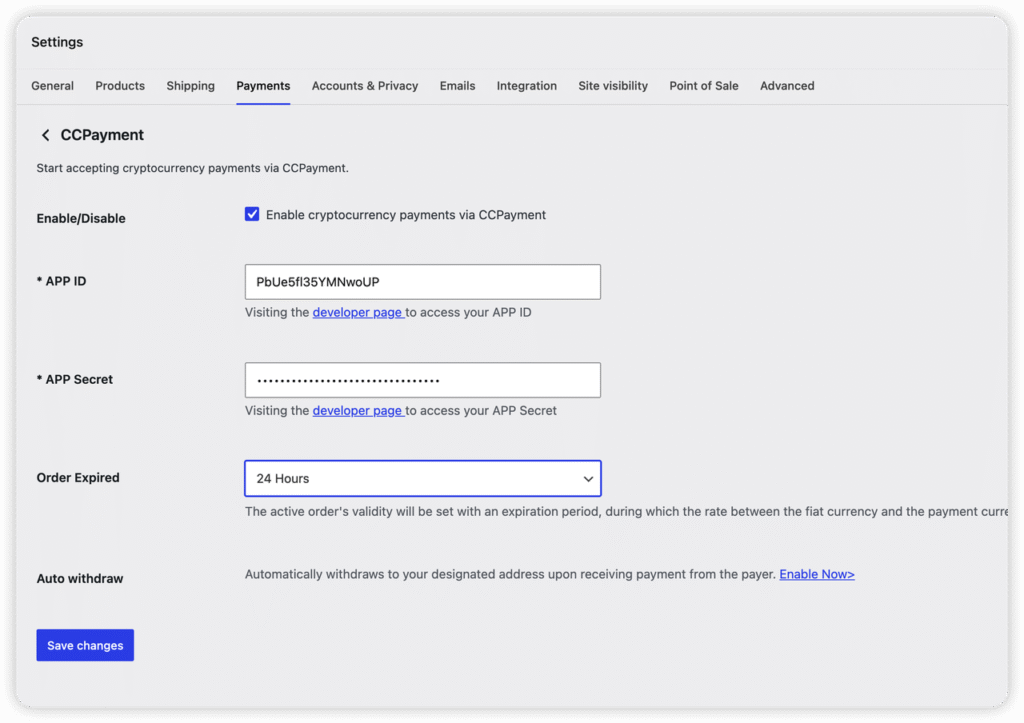
Step 4: Enable cryptocurrency payments. Complete the required configuration and enable the payment method so that it becomes available in the store’s checkout.
Step 5: Test the complete payment flow. Before accepting real customer payments, verify that checkout instructions are clear, transactions are reflected correctly, payment statuses update as expected, and the resulting WooCommerce orders behave appropriately.
Merchants should follow the latest official documentation because plugin versions, technical requirements, and configuration procedures can change. They should also protect merchant credentials and avoid exposing sensitive integration details in publicly accessible code or configuration files.
Advantages and Limitations of CCPayment
CCPayment has several strengths for businesses interested in cryptocurrency payments.
First, it reduces integration complexity. The ready-made WooCommerce plugin means merchants do not need to build every part of the crypto payment process themselves. This is a practical advantage for businesses with limited development resources.
Second, it offers broad asset coverage. CCPayment supports 900+ cryptocurrencies across 100+ blockchain networks. This gives merchants access to a wide range of potential payment options, although the exact assets available through a particular integration should always be checked against current documentation.
Third, it connects payment processing with store operations. Payment-status updates and WooCommerce order integration can reduce manual work and make it easier to follow transactions.
Fourth, automatic conversion and withdrawal options provide additional flexibility. Businesses can explore ways to manage the digital assets they receive instead of necessarily retaining every payment in its original cryptocurrency.
There are also limitations to consider.
Cryptocurrency payments are not automatically suitable for every store. Merchants whose customers primarily use cards or conventional bank transfers may see limited demand for another payment option. Adding crypto checkout is most valuable when it serves a genuine customer need or supports the business’s international payment strategy.
There is also a learning curve. Store owners need to understand supported networks, transaction confirmation, conversion settings, wallet security, and the difference between crypto balances and conventional bank deposits. The availability of a plugin does not remove these responsibilities.
Finally, merchants should review the provider’s current fees, service availability, supported assets and networks, support arrangements, and applicable legal or compliance requirements before committing to the platform. Testing the gateway directly is therefore particularly important.
Who Should Use CCPayment?
CCPayment is worth considering for several types of businesses.
WooCommerce stores expanding their payment options: Merchants who already use WordPress and WooCommerce can explore cryptocurrency acceptance without replacing their existing e-commerce setup.
International online businesses: Stores serving customers in multiple markets may benefit from offering supported digital assets to buyers who prefer cryptocurrency payments.
Digital product and service providers: Businesses selling software, downloadable products, or online services may find crypto payments relevant if their audiences are comfortable using digital assets.
Businesses seeking simpler crypto treasury workflows: Merchants who receive cryptocurrency and want access to transaction management, conversion, and withdrawal capabilities may appreciate the broader CCPayment platform.
By contrast, a business with little customer demand for cryptocurrency may not benefit enough to justify introducing another payment method. Merchants should consider their audience, operational capacity, and financial requirements before adopting the gateway.
Final Verdict: Is CCPayment Worth It?
CCPayment offers a practical approach to introducing cryptocurrency payments into WooCommerce stores. Its ready-made plugin, multi-currency and multi-chain capabilities, payment-status updates, and automatic conversion options address several of the challenges businesses face when accepting digital assets.
Its main appeal is the way it connects the customer checkout experience with payment processing and merchant-side management. Rather than requiring a store owner to develop an independent crypto payment system, CCPayment provides an existing integration that can be configured alongside WooCommerce.
That said, choosing a crypto payment gateway requires more than evaluating its feature list. Merchants should test the plugin in their own environment, verify the assets and networks they intend to support, review current fees and withdrawal conditions, and establish appropriate accounting and security procedures.
Overall, CCPayment is a practical option for WooCommerce merchants who want to add cryptocurrency payments without building the underlying infrastructure themselves. Businesses with crypto-aware customers and a clear need for alternative payment methods may find its combination of checkout integration and merchant payment management particularly useful. Its suitability ultimately depends on the store’s requirements, the provider’s current terms, and the results of practical testing before launch.