Most articles about the best WordPress social media plugins list 15 or 20 options. By the time you finish reading, you are not sure which one to install. The list is long, the plugins start to blur together, and you close the tab without a decision.
This article is built differently. More than 20 WordPress social media plugins were reviewed for this guide, covering four categories with at least five options assessed per group. The result is one clear recommendation for each job, with an honest look at what it does well and where it falls short.
Here are the four jobs this article covers:
- Publishing WordPress content to your social accounts automatically
- Displaying live social media feeds on your WordPress site
- Helping visitors share your content with their own networks
- Running social giveaways and campaigns to grow your following
If you need a plugin for one or more of these jobs, this guide gives you a direct answer.
Quick comparison
| Category | Best plugin | Free plan | Paid starting price |
| Auto-posting and scheduling | FS Poster | No | $58/year |
| Social feeds and widgets | Smash Balloon | Yes (basic) | $49/year |
| Share buttons | AddToAny Share Buttons | Yes (full) | Free |
| Giveaways and social growth | RafflePress | Yes (basic) | $299 one-time |
1. Best for auto-posting and scheduling: FS Poster
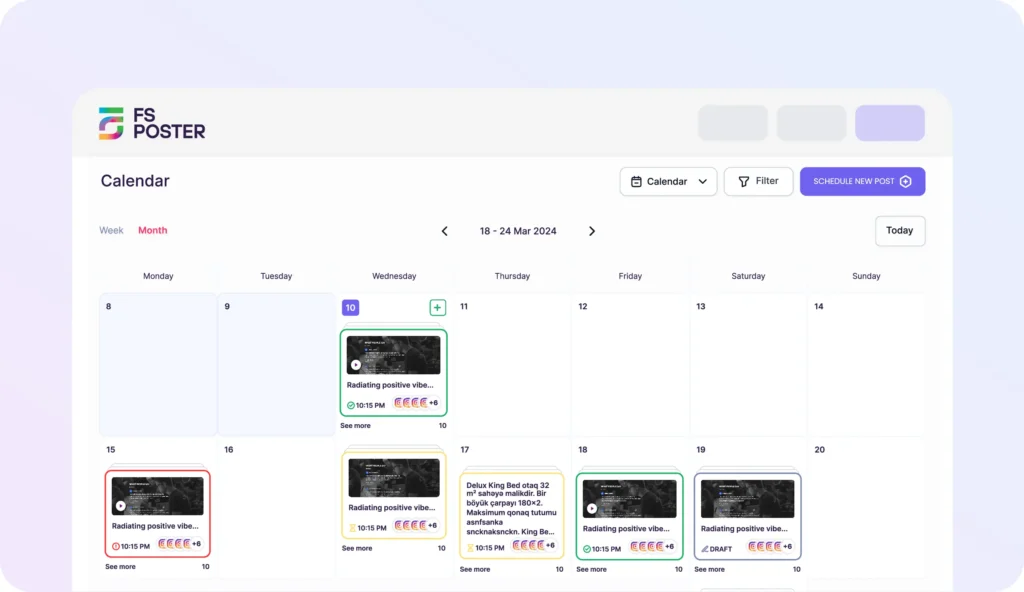
Best for: WordPress publishers, WooCommerce stores, and agencies that want new posts and products shared to every major social network automatically, with a real scheduling calendar and per-network control.
When you publish a WordPress post, the typical workflow is to copy the link, open each social platform one by one, write something, paste the link, and post. That might work for a site that publishes twice a week. It does not work when you publish daily, run a store with hundreds of products, or manage more than one site.
FS Poster is a WordPress-native auto-posting and scheduling plugin that replaces that manual workflow. You connect your social accounts, configure your posting rules once, and every time you publish, FS Poster pushes the content out with the right caption, image, and link, without you touching a third-party app.
The reason FS Poster wins this category in 2026 comes down to breadth and depth. Most WordPress auto-posters cover three to eight networks and stop there. FS Poster covers 26 social networks and services from one license, including Facebook, Instagram, Threads, X, LinkedIn, Pinterest, TikTok, YouTube, Bluesky, Mastodon, Reddit, Telegram, Discord, Google Business Profile, VK, OK.ru, Tumblr, Medium, and a generic Webhook destination for anything else. Multiple accounts per network are supported, so a brand page and a community group can both receive the same post at the same time.
For content planning, FS Poster includes a scheduling calendar and a Planner view inside the WordPress admin. You can queue posts days or weeks ahead, build evergreen reshare cycles, and see everything laid out on a real calendar without switching to a separate app.
Custom messages are handled through per-network templates with variable tags. You can insert post title, excerpt, URL, category, tags, and for WooCommerce products, price and product name. This means each network gets a caption that fits the format rather than the same generic text everywhere. The AI templates feature generates captions using your own OpenAI key, which saves a lot of time when you are posting to ten or more channels regularly.
WooCommerce support and custom post types are native. Product posts, pages, and any custom post type your site uses can be included or excluded from the auto-posting rules per category, without any custom code.
Key features:
- 26 social networks and services from one license, multiple accounts per network
- Auto-publish on WordPress posts, pages, WooCommerce products, and custom post types
- Per-category routing rules so you control which content goes where
- Scheduling calendar and Planner view for content planning inside the WordPress admin
- Per-network custom messages with variable tags for title, excerpt, price, category, and more
- AI caption and AI image prompts using your own OpenAI key
- Evergreen content cycles through the Planner for resharing older content on a schedule
- Click tracking, per-channel dispatch logs, and automatic retry on failure
Pricing: FS Poster is paid only. Single site starts at $58/year. The Plus plan covers three sites at $109/year, Developer covers up to 10 sites at $229/year, and a Lifetime tier is available at $490 one-time for anyone who prefers to avoid annual renewals. Every plan comes with a 14-day money-back guarantee.
One limitation: There is no permanent free tier. If you want to test the plugin before committing, the money-back window is your evaluation period.
2. Best for social feeds and widgets: Smash Balloon
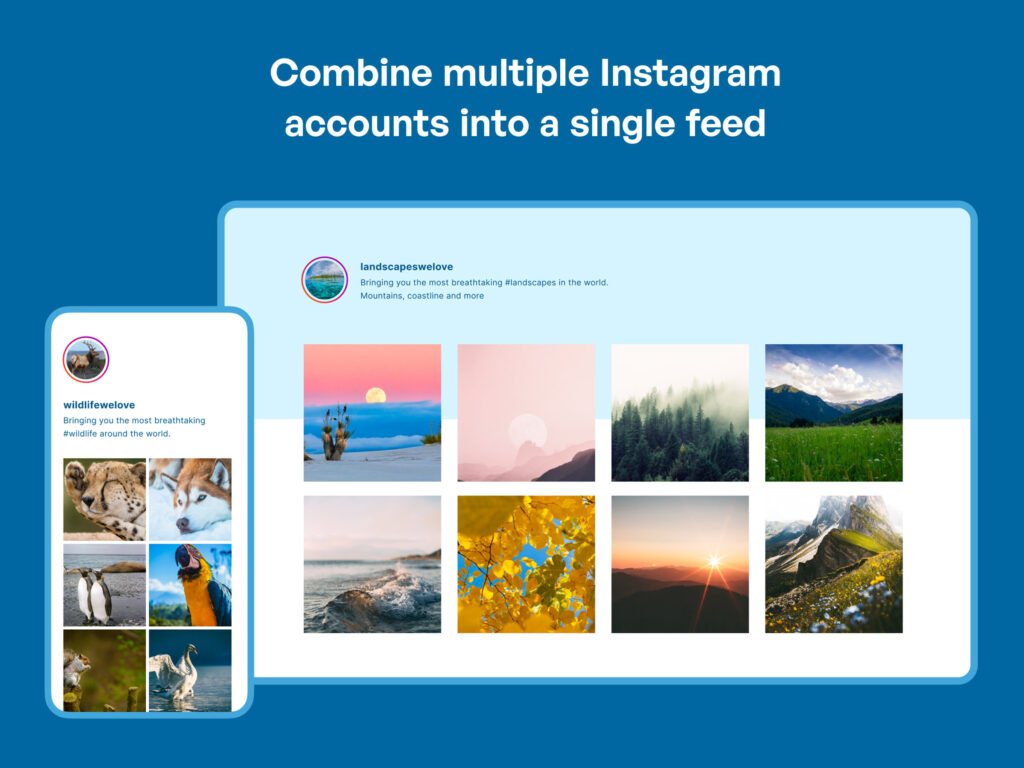
Best for: Brands, creators, hospitality sites, and agencies that want to embed live Instagram, Facebook, YouTube, or TikTok feeds on a WordPress site with a polished, customizable layout.
A social feed plugin works the opposite way from an auto-poster. Instead of sending WordPress content out to your social accounts, it pulls your social content back into the site and displays it as an embedded feed, gallery, or widget. This is useful for homepages that want to show real Instagram activity, restaurant sites that display recent Facebook posts, or creators who want a YouTube playlist on their about page.
Smash Balloon is the strongest option in this category. It makes a family of dedicated feed plugins: one for Instagram, one for Facebook, one for YouTube, one for TikTok, one for X, one for reviews, and a combined Social Wall plugin that pulls from all of them into a single widget. Each plugin uses the same visual customizer and shares one design system, so a site that needs two or three networks does not have to learn a different interface for each one.
The live customizer is what separates Smash Balloon from the competition. When you configure a feed, the customizer loads real posts from the connected account on the right side of the screen while you adjust the layout and style settings on the left. Grid, masonry, carousel, and highlight-row layouts are available for Instagram. Facebook feeds support event grids and photo albums. YouTube feeds support playlists and live streams.
On WordPress.org, the Instagram Feed plugin alone has more than one million active installs and a 4.9 out of 5 rating from over 4,000 reviews. That kind of install evidence matters in a category where several smaller tools look similar on a feature list but fall apart in practice.
Key features:
- Separate feed plugins for Instagram, Facebook, YouTube, TikTok, X, and reviews
- Live drag-and-drop customizer that previews real account posts as you design
- Grid, masonry, carousel, and highlight-row layouts, depending on the network
- Shoppable Instagram: link posts directly to WooCommerce product pages or custom URLs
- Image caching and lazy loading designed to protect Core Web Vitals scores
- One design system shared across all plugins in the family
Pricing: Instagram Feed Pro Basic starts at $49/year intro on the Smash Balloon pricing page; renewals step up after year one, so confirm the renewal rate before purchasing. The All Access Bundle, which includes every plugin in the family, starts at $299/year intro. A free tier on WordPress.org covers a single basic feed per network on each plugin.
One limitation: Each network is its own plugin, sold separately on the lower tiers. If you need Instagram, YouTube, and Facebook feeds at once, the All Access Bundle is the more practical starting point.
3. Best for share buttons: AddToAny Share Buttons
Best for: Almost any WordPress site that wants clean, fast share buttons without a paid subscription or complex setup.
Most share-button plugins have a problem. The free ones support four or five networks and stop there. The paid ones add features you probably do not need and charge monthly for them. AddToAny avoids both traps.
AddToAny is a free WordPress plugin that supports more than 95 sharing and bookmarking services from a single install. The list covers every network that matters in 2026, including the older ones like Facebook, X, Pinterest, LinkedIn, and Reddit, and the newer ones like WhatsApp, Telegram, Threads, Bluesky, and Mastodon. Buttons appear inline below or above your content, in a floating sidebar, or as a follow widget in any sidebar.
The analytics side is handled through native integrations with Google Analytics, GA4, and Google Tag Manager. Share clicks fire as events in your existing analytics setup, so you can track social sharing without adding a separate service.
The plugin is self-hosted, meaning it loads from your own WordPress server and does not place third-party tracking cookies on your visitors. This makes it a safe default for sites that need to be careful about privacy compliance.
AddToAny has been the most-installed share-button plugin on WordPress.org for years, with more than 300,000 active installs. That long track record means you are not betting on a tool that might disappear in six months.
Key features:
- 95-plus sharing and bookmarking services, including all major modern networks
- Inline, floating bar, and follow widget placement options
- Native integration with Google Analytics, GA4, and Google Tag Manager for share-click events
- Gutenberg block, shortcode, sidebar widget, and PHP template tag support
- Privacy-first defaults: self-hosted assets, no third-party tracking cookies
- AMP-compatible
Pricing: Free. There is no paid tier for the WordPress plugin itself. Nothing is locked behind a premium.
One limitation: The admin has minimal visual design controls. If you need per-post custom button colors, Pinterest-specific hidden images, or an in-dashboard share-count analytics report, you will need a premium alternative. For everyone else, AddToAny is the right first install.
4. Best for giveaways and social growth: RafflePress

Best for: WordPress site owners who want to run social media giveaways, viral referral contests, and follower-growth campaigns from inside WordPress, without a separate SaaS subscription.
Building a social following organically takes time. Giveaways can speed it up. The model is simple: you offer a prize, and participants earn entries by completing social actions such as following your accounts, sharing your content, tagging a friend, or watching a video. A giveaway plugin automates all the entry counting and verification so you are not managing a spreadsheet.
RafflePress is the leading WordPress giveaway plugin in 2026. It gives you a drag-and-drop giveaway builder inside the WordPress admin, with pre-built entry actions tied to specific social networks. A participant can earn entries by following your Instagram account, visiting your Facebook page, watching a YouTube video, sharing a tweet, subscribing to your newsletter, and more. Each action is a trackable, verifiable entry method.
What makes RafflePress stand out is how it handles viral growth. Participants can earn bonus entries by referring their friends to the giveaway, which creates a sharing loop that multiplies reach without paid ads. The referral tracking is built into the plugin, so you do not need a separate referral tool on top of it.
The free version on WordPress.org covers a basic single-giveaway setup. The paid version adds the full library of social entry actions, multiple simultaneous giveaways, email platform integrations, advanced fraud detection, giveaway landing page templates, and detailed analytics.
Key features:
- Drag-and-drop giveaway builder inside the WordPress admin
- Entry actions tied to Instagram, Facebook, X, YouTube, TikTok, Pinterest, Telegram, and more
- Viral referral tracking: participants earn bonus entries for each friend they refer
- Email integrations with Mailchimp, ConvertKit, Drip, ActiveCampaign, and others
- Giveaway landing page templates, no separate page builder needed
- Fraud detection to filter duplicate entries and bot submissions on paid plans
- Built-in winner picker
Pricing: RafflePress has a free version on WordPress.org. The Pro paid version is a one-time lifetime license: $299 for a single site or $349 for unlimited sites. Both tiers include all features, lifetime updates, and one year of priority support. No annual subscription is required.
One limitation: The most valuable entry actions, including referral tracking and the extended social network library, require the paid version. The free tier is enough for a basic giveaway but limited for a serious growth campaign.
How to build your WordPress social media stack
You do not need all four of these plugins running at the same time. Think about which job matters most for your site right now.
If you want new WordPress posts and products pushed to your social accounts automatically, install FS Poster first. It is the most complete auto-posting plugin on WordPress in 2026, and it handles the distribution job that most growing sites need before anything else.
If you want live social content embedded somewhere on your site, add Smash Balloon. It is the most polished feed solution available.
If you want visitors to be able to share your content with their own networks, install AddToAny. It takes five minutes, it is free, and it adds no performance cost worth worrying about.
If you want to actively grow your social following with a campaign, set up a giveaway with RafflePress. It works well as a standalone push when you are launching a new product or trying to break through a plateau.
For most WordPress sites in 2026, the right starting stack is FS Poster plus AddToAny. FS Poster handles outbound distribution so your content reaches your audience. AddToAny handles inbound sharing so your audience can extend that reach for you. Everything else in this list is optional depending on your situation.
One plugin per job. That is the cleaner approach.
FAQ
What is the best WordPress social media plugin in 2026?
The best WordPress social media plugin depends on what you need. For auto-posting and scheduling WordPress content to social networks, FS Poster is the strongest pick. F social feeds, Smash Balloon is better. For share buttons, AddToAny is the simplest option. For giveaways and social growth campaigns, RafflePress is the better fit.
What is the best WordPress plugin for auto-posting to social media?
FS Poster is the best option if your main goal is to auto-post WordPress posts, WooCommerce products, pages, and custom post types to social media. It supports 26 social networks, multiple accounts per network, a scheduling calendar, custom post messages, category filters, and AI-assisted templates.
Do I need more than one social media plugin for WordPress?
Usually, yes, if you need different jobs handled well. One plugin may handle auto-posting, another may handle social feeds, and another may add share buttons. The cleaner approach is to use one strong plugin per job instead of installing several overlapping tools that do the same thing.
Is FS Poster a social share button plugin?
No. FS Poster is not mainly a front-end share button plugin. It is a WordPress social media auto-poster and scheduler. It helps site owners automatically publish and schedule content from WordPress to social networks. If you only need visitor-facing share buttons, AddToAny is a better fit.
Which WordPress social media plugin is best for WooCommerce stores?
For WooCommerce stores that want to promote products on social media automatically, FS Poster is the best fit in this list. It can share WooCommerce products, use product-related variables in post messages, and schedule product content across supported social networks.
Click here for more.