Managing inventory manually can quickly become overwhelming as your WooCommerce store grows. Whether you’re handling hundreds of products, fulfilling daily orders, or operating a physical retail location alongside your online store, speed and accuracy are essential. This is where the WooCommerce Barcode Scanner Plugin stands out.
Designed for warehouses, retail stores, wholesalers, and eCommerce businesses, the WooCommerce Barcode Scanner Plugin transforms barcode scanning into a complete inventory, order management, and point-of-sale solution. Instead of manually searching for products or updating stock levels, you can perform these tasks in seconds with a barcode scanner or even a mobile device.
In this review, we’ll explore its features, benefits, use cases, and why it’s one of the best barcode management plugins available for WooCommerce.
What is WooCommerce Barcode Scanner?
WooCommerce Barcode Scanner is a feature-rich inventory management plugin that allows store owners to scan product barcodes for fast product searches, inventory updates, order fulfillment, and checkout operations.
The plugin supports virtually all USB and wireless barcode scanners, along with Android and iOS devices, making it suitable for businesses of all sizes—from small online shops to large warehouses.
Rather than simply adding barcode support, the plugin creates an efficient workflow that minimizes manual work, reduces fulfillment mistakes, and improves overall productivity.
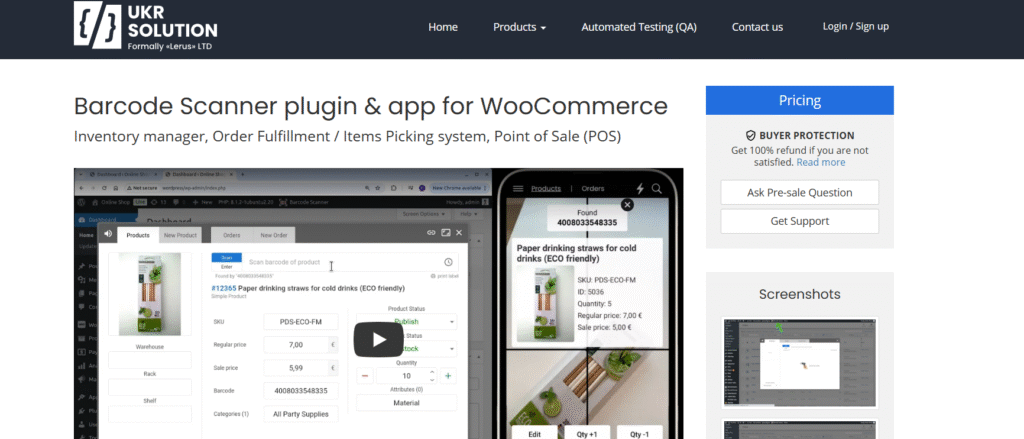
Key Features
Lightning-Fast Barcode Search
One of the plugin’s biggest strengths is its incredibly fast search capability.
Instead of manually browsing your WooCommerce catalog, simply scan a barcode to instantly locate products or orders.
It supports searching by:
- Barcode
- SKU
- Product ID
- EAN
- UPC
- GTIN
- Product name
- Custom fields
This significantly reduces the time employees spend searching for products.
Efficient Inventory Management
Keeping inventory accurate is one of the biggest challenges for growing stores.
The plugin allows you to:
- Increase stock by scanning products during restocking
- Decrease inventory during stock adjustments
- Perform inventory counts much faster
- Reduce human error during stock updates
For stores with frequent inventory movement, barcode scanning dramatically simplifies stock management.
Faster Order Fulfillment
Order fulfillment mistakes can lead to unhappy customers and expensive returns.
The WooCommerce Barcode Scanner Plugin helps prevent these errors by allowing staff to scan every item while picking orders.
Each successful scan provides:
- Audio confirmation
- Visual confirmation
- Instant verification
This ensures the correct products are packed before shipping.
Built-In Point of Sale (POS)
The plugin also functions as a WooCommerce Point of Sale system.
Retail businesses can:
- Scan products during checkout
- Process offline purchases
- Use WooCommerce as their central inventory database
This eliminates the need for separate POS software for many businesses.
Mobile App Support
Warehouse staff don’t always work behind a desktop computer.
The plugin supports Android and iOS devices, allowing users to:
- Scan products
- Update inventory
- Pick orders
- Manage warehouse operations
This flexibility makes inventory management much more convenient.
Create Products by Scanning
One particularly useful feature is the ability to create new products simply by scanning a previously unused barcode.
Instead of manually entering barcode information, the plugin uses the scanned barcode to begin product creation, speeding up catalog management.
Product Location Management
Large warehouses often struggle with locating products.
The plugin allows you to assign:
- Shelf locations
- Warehouse zones
- Bin numbers
- Storage positions
Employees can immediately see where products are stored, reducing picking time considerably.
Custom Product Fields
Many WooCommerce stores use custom fields for inventory information.
The plugin allows staff to:
- View custom fields
- Edit custom fields
- Update product information
All directly within the barcode scanner interface.
User Role Permissions
Not every employee should have access to every setting.
WooCommerce Barcode Scanner includes role-based permissions that allow administrators to decide:
- Which fields users can see
- Which fields users can edit
- Which inventory actions users can perform
This improves security while maintaining efficient workflows.
Activity Logs
Inventory changes are fully logged.
Store owners can monitor:
- Stock edits
- User actions
- Inventory adjustments
- Product updates
Activity logs provide accountability and make troubleshooting much easier.
Broad Scanner Compatibility
Hardware compatibility is another strong advantage.
The plugin works with:
- USB barcode scanners
- Wireless barcode scanners
- Handheld scanners
- Most popular barcode formats
Businesses don’t need specialized hardware to start using the plugin.
WooCommerce & Third-Party Integrations
WooCommerce Barcode Scanner integrates seamlessly with WooCommerce and works alongside many popular plugins for:
- Shipping
- Inventory management
- Multilingual stores
- Barcode generation
- Warehouse workflows
This makes it suitable for businesses with existing WooCommerce ecosystems.
Developer Friendly
Developers will appreciate the plugin’s flexibility.
It includes:
- WordPress hooks
- Filters
- Customization options
- Integration capabilities
This makes it easier to extend the plugin for custom business requirements.
Performance
One of the most impressive aspects of the WooCommerce Barcode Scanner Plugin is how much time it saves during everyday operations.
Tasks that previously required multiple clicks—such as locating products, updating inventory, or verifying orders—can be completed with a quick barcode scan.
For businesses processing dozens or even hundreds of orders each day, these time savings quickly add up while also reducing costly fulfillment errors.
Who Should Use This Plugin?
The WooCommerce Barcode Scanner Plugin is an excellent choice for:
- WooCommerce store owners
- Warehouse managers
- Retail stores
- Wholesale businesses
- Dropshipping warehouses
- Distribution centers
- Businesses with large inventories
- Companies looking for an integrated WooCommerce POS solution
Whether you manage a small product catalog or thousands of SKUs, the plugin scales well with business growth.
Pros
- Easy to use
- Fast barcode-based product search
- Excellent inventory management tools
- Built-in order verification
- Mobile device support
- POS functionality included
- Product location management
- Broad barcode scanner compatibility
- Flexible user permissions
- Activity logs for accountability
- Developer-friendly customization
Cons
- Some advanced features may require initial setup for larger warehouses.
- Businesses new to barcode workflows may need a short onboarding period to optimize their processes.
Final Verdict
The WooCommerce Barcode Scanner Plugin is much more than a barcode scanner—it is a comprehensive inventory, order fulfillment, and warehouse management solution for WooCommerce stores. By combining fast barcode searches, real-time inventory updates, order verification, mobile support, and POS functionality into a single plugin, it helps businesses improve operational efficiency while reducing manual errors.
Whether you’re managing a growing online store, running a warehouse, or operating both an eCommerce and physical retail business, this plugin offers practical tools that streamline daily operations and save valuable time. Its extensive hardware compatibility, flexible permissions, and developer-friendly architecture make it suitable for businesses of all sizes.