Kirki vs Elementor, which one should I use in 2026?
You might have come across this question a lot this year. You are quoting a new client project, Elementor is open in one tab and a Figma file in another, and you are wondering whether your current builder is actually giving you the best outcome or just the most familiar one.
Both Kirki and Elementor live inside WordPress, both let you build pages visually, and both have active user bases. Yet they take fundamentally different approaches to how a page gets designed, maintained, and delivered to a client.
The decision is not just about features. Cost compounds over time, creative freedom has real workflow consequences, and post-build maintenance adds up.
This comparison cuts through the noise on four real decision points: cost, design control, performance, and long-term workflow. Kirki is the newer challenger, built around a freeform infinite canvas that replaces the traditional grid structure entirely. Elementor is the established name with a massive ecosystem. By the end, you will know which one fits your actual situation, not just which one has the longer marketing page.
What each builder actually costs you in 2026
The pricing difference between these two builders is more significant than most comparison articles acknowledge. According to Kirki’s official pricing page, the free plan is genuinely free: no credit card required, no time limit, and it includes the core infinite canvas editor, responsive controls, staging mode, a form builder, and Figma import. The Pro plan is $59 per year for one site, and the Agency licence is $149 per year for unlimited sites. A Lifetime option is available at $499 as a one-time payment. For freelancers managing a pipeline of client sites, the Agency licence can pay for itself once you cross three or four projects annually, cheaper than maintaining separate Elementor Pro licences for each.
Elementor’s free editor is functional but significantly limited. The features that matter on a professional project like Theme Builder, Popup Builder, dynamic content, WooCommerce templates, and custom CSS, are locked behind Elementor Pro, according to Elementor’s official feature listing. Pro starts at $59 per year for one site and climbs to $199 per year for 25 sites and $399 per year for agency-scale use. A freelancer running eight to ten client sites annually is looking at a substantial annual spend just to maintain access to tools that Kirki includes at a much lower Agency tier price point.
The long-term cost calculation must also include plugin overhead. Elementor Pro still depends on third-party plugins for tasks like custom fields and advanced CMS functionality, which means additional costs and update management on top of the base licence. Kirki’s paid plans consolidate more of those functions natively, for example, custom fields and dynamic templates that would otherwise require a separate paid plugin, reducing both cost and complexity as your client base scales.
Design freedom: infinite canvas versus section-row-column grids
This is the sharpest dividing line between the two builders, and the main reason designers who work in Figma feel constrained the moment they open Elementor. Elementor is built on a section, row, and column hierarchy. Every element on the page has to live inside that structure. You can push against it with custom CSS and creative workarounds, but the grid is always underneath, shaping what is possible before you even start designing.
Kirki’s canvas removes that constraint entirely. It gives you an infinite canvas and freeform positioning for Fixed and Absolute positions. Elements go anywhere, overlap freely, and layer exactly as they would in a design tool, positioning content with the same spatial logic you use in Figma.
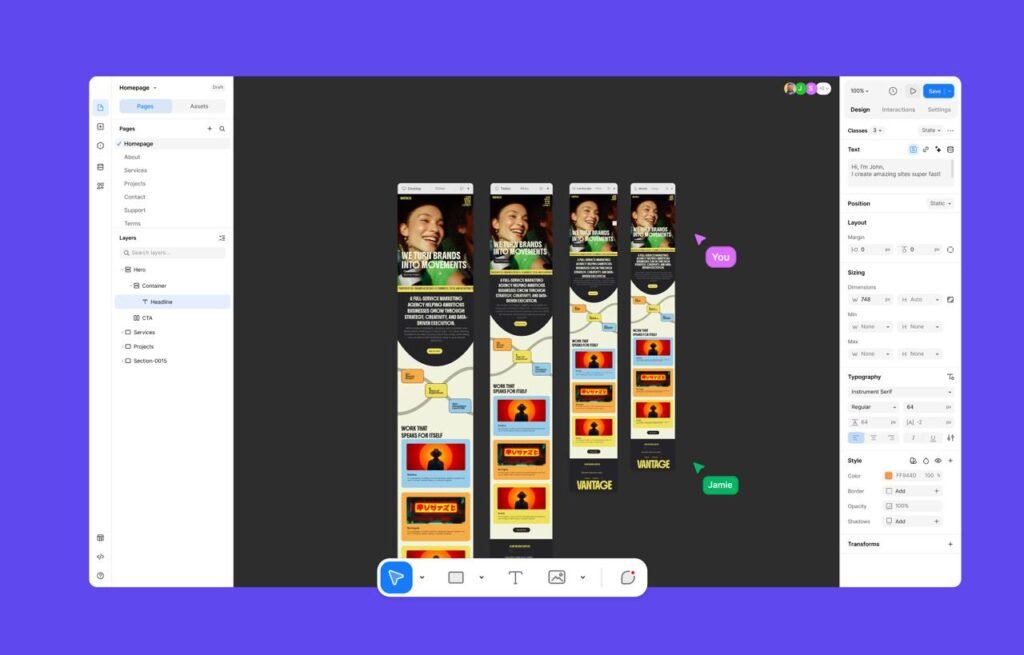
For designers who think spatially and want pixel-level control, the creative process shifts noticeably: the tool stops being the obstacle and starts being the medium. Kirki also includes global styles and a CSS variable system, so colour, typography, and spacing decisions apply site-wide from one place rather than being manually replicated across sections.
Elementor’s structured system has strengths too. Its section and column model is familiar to a large portion of the WordPress market, which makes building a website more predictable.

However, for the freelancer or agency that wants to deliver layouts matching an approved Figma file without workarounds, Kirki’s canvas and direct Figma-to-Kirki import is the more direct route from design to published page.
Animation and Interaction: timeline control versus preset effects
Elementor’s animation options are largely preset-based: entrance effects, hover states, and a handful of scroll triggers, functional, but limited to what’s already been built into the widget. Anything more ambitious, staggered reveals, multi-step sequences, motion tied precisely to scroll position, typically means custom JavaScript or a third-party animation plugin layered on top.
Kirki’s Interaction engine takes a different approach. It includes a library of ready-made presets for common effects, staggered reveals, parallax scroll, cursor-follow interactions, text animations at the character or word level, so simple motion doesn’t require any manual setup. But it also opens into a full visual timeline for anyone who needs more: multi-step sequences, elements that trigger or influence each other, and physics-based spring transitions that move with real momentum instead of a flat easing curve.
The detail that matters most for a working freelancer is Kirki lets you scrub through the timeline frame by frame before committing, so you can see exactly how an animation plays out instead of publishing, previewing, and adjusting in a loop. For a client build where “make it feel right” is the actual brief, that’s a meaningfully faster way to get there than trial and error inside a plugin’s animation panel. For projects where motion is part of the pitch, an agency portfolio, a product launch page, anything meant to feel current rather than templated, this is one of the more concrete gaps between the two builders in 2026.
Kirki vs Elementor performance in 2026: what the numbers reveal
Performance is a genuine concern with any visual builder, and Elementor has a well-documented overhead problem. A controlled case study by WP Bullet found Elementor generating 356 div tags and 99 KB of markup against 77 divs and 28 KB for a block-editor equivalent, with nearly double the page weight (512 KB vs 331 KB) and 4x higher server processing time (679 ms vs 172 ms). These gaps show up before any custom CSS or plugins are added on top.
To achieve optimisation it requires caching, image compression, script management, and CSS cleanup as separate ongoing tasks.
Kirki’s structural performance advantage
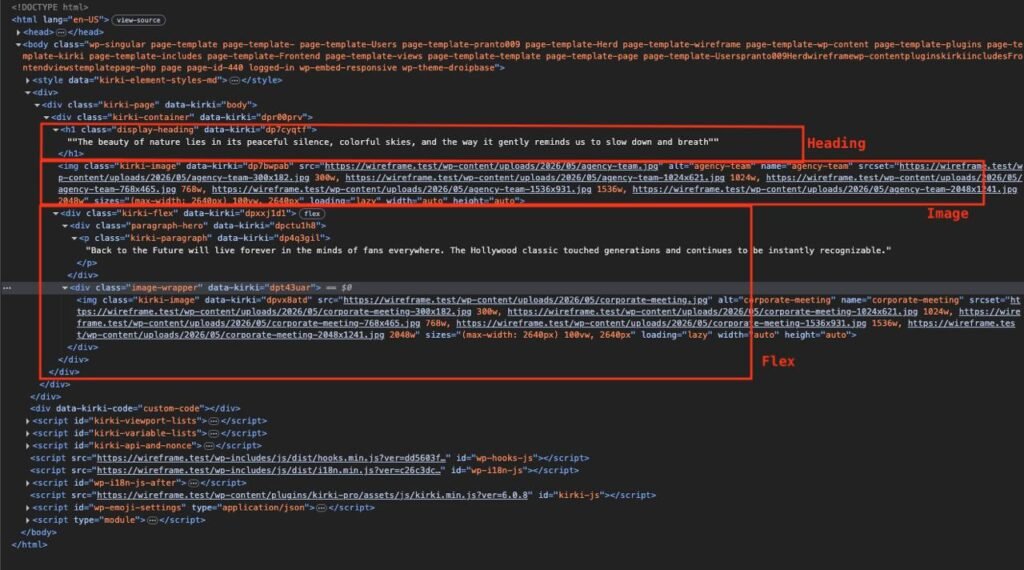
The structural argument is straightforward for Kirki. Kirki produces fewer nested DOM wrappers and a leaner default script footprint, which means the browser does less work before the page renders. For client sites on shared hosting, where server response times are already a variable, that default lightness matters more than it would on a managed cloud host. Less script overhead translates directly into fewer performance plugins needed after launch.
Asking which builder wins in a lab test misses the point for most freelancers. The better question is which one delivers a fast site without requiring a separate stack of performance tools on top. Starting lighter means less maintenance work and faster project delivery, an advantage that compounds across every site in your roster.
Built-in CMS and dynamic content without extra plugins
For any client site that needs custom post types, filterable content listings, or dynamic page templates, the CMS capability of your builder becomes central to the decision. Elementor Pro supports dynamic content, but the full workflow typically requires a third-party custom fields plugin to handle the data layer, an additional plugin to maintain, update, and pay for, plus the integration complexity that comes with it.
Kirki’s Pro plan includes a native CMS with custom fields, dynamic templates, filtering, pagination, and scheduled publishing built directly into the builder. No third-party dependency needs configuring or maintaining. For content-heavy sites, educational platforms, portfolio archives, news sections, or product catalogues, that single integration removes an entire layer from the stack. The practical benefit: fewer update conflicts, fewer potential security vulnerabilities, and a site that is easier to hand off to a client without a breakage every time a plugin updates.
This native CMS approach is one of the clearest areas where the builder’s design philosophy pays off in day-to-day agency work. Instead of assembling a solution from multiple tools, you are working within one coherent system, and your client is not dependent on three separate plugin authors staying in sync.
Collaboration and agency workflow tools
Real-time collaboration was once a Figma-only capability. Kirki brings it into WordPress with multi-editor support, design comments directly on the canvas, staging mode, and client share links, all available without leaving the builder. For agencies where a designer, a developer, and a client need to interact with the same build at different stages, this represents a genuine shift in how the team works. Client approvals happen inside the tool rather than through a chain of screenshots and email threads.
Elementor’s collaboration capabilities are considerably more limited. Its standard workflow is single-editor, and client review typically happens through external staging setups or live preview links that do not allow inline feedback. For a freelancer working solo, that gap is manageable. For anyone running a small studio with even two or three active projects at once, Kirki’s built-in workflow tools can replace several separate paid services.
Which one should you use in 2026? Matching the builder to your situation
Not every project is the same, and the right builder depends on what you are actually building. Kirki is the stronger choice for freelancers who want a capable free plan that does not expire or push them toward a paid upgrade to get basic work done. It is the clear pick for designers who want pixel-perfect layouts without negotiating with the design system, and for agencies who need a native CMS and built-in collaboration without adding plugins to achieve either. The Figma import feature alone can save several hours on projects where a client has already approved a design before development starts, eliminating the manual rebuild step entirely.
Elementor still holds its ground in one specific scenario: WooCommerce-heavy builds where its native cart and checkout builder provides deep integration with the store layer. If your entire team is already trained on Elementor and your client roster is predominantly eCommerce, the migration cost may outweigh the benefits of switching in the short term. But having said that, Kirki eCommerce is on the way too. It’s still in the alpha stage but looking solid already.
For most freelancers and agencies building portfolios, business sites, landing pages, and content-driven projects, the comparison resolves fairly clearly. Kirki’s combination of design freedom, a native CMS, real-time collaboration, and a genuinely usable free tier gives it a practical advantage across the majority of project types you are likely to encounter in 2026, particularly for multi-site freelancers where the Agency licence pricing stacks up well against comparable Elementor plans.
The bottom line for freelancers and agencies
The core question was never which builder has more widgets. It was which one lets you do your best work without fighting the tool, without paying agency-level subscription fees before you can access the features that actually matter. For creative professionals who want Figma-level layout freedom, a built-in CMS that reduces plugin dependency, and pricing that scales sensibly as your client base grows, Kirki is the more logical choice heading into 2026.
Elementor remains a capable and widely understood tool with a large support community. But its structural constraints, reliance on third-party plugins for CMS functionality, and higher Pro pricing for multi-site use make it a harder argument to sustain when a builder offering comparable entry cost and more native features already exists. The ecosystem advantage Elementor built over the past decade is real; it simply does not automatically translate into better outcomes for the sites you are building today.
Testing Kirki against a current project is straightforward. The free plan has no time limit and no credit card requirement, and the Figma importer lets you bring an existing approved design into the canvas to validate the workflow against real work before committing to anything. For a freelancer weighing the Kirki vs Elementor question in 2026, that is a low-risk, practical way to see whether a switch makes sense without disrupting live client projects.
Click here for more.