Building a WordPress form sounds simple until a website needs more than a basic name, email, and message field. Businesses may need lead-generation forms, surveys, registrations, booking forms, file uploads, conditional questions, payment forms, and reliable email notifications — all managed without custom coding.
That is where WordPress form builders become useful. Instead of coding individual forms from scratch, website owners can create them visually and manage submissions directly from WordPress.
Easy Form Builder by WhiteStudio is a WordPress form builder that combines drag-and-drop form creation with conditional logic, submission management, email notifications, advanced fields, payment options, and third-party integrations.
For this review, we looked beyond the feature list and focused on the parts that matter when actually working with a form builder: how the builder is structured, how conditional logic is configured, how submissions are managed, and how the plugin approaches one of the most common WordPress form problems — email delivery.
So, is Easy Form Builder worth trying? Here is what stood out. Easy Form Builder is a strong choice for small businesses, agencies, support websites, and WordPress users who need advanced form functionality without immediately paying for a premium plan. Its main strengths are Free Plus, conditional logic, built-in email deliverability diagnostics, media recording fields, and local submission management.
However, users who prioritize the largest third-party integration ecosystem may prefer more established alternatives such as WPForms or Fluent Forms.
What Is Easy Form Builder?
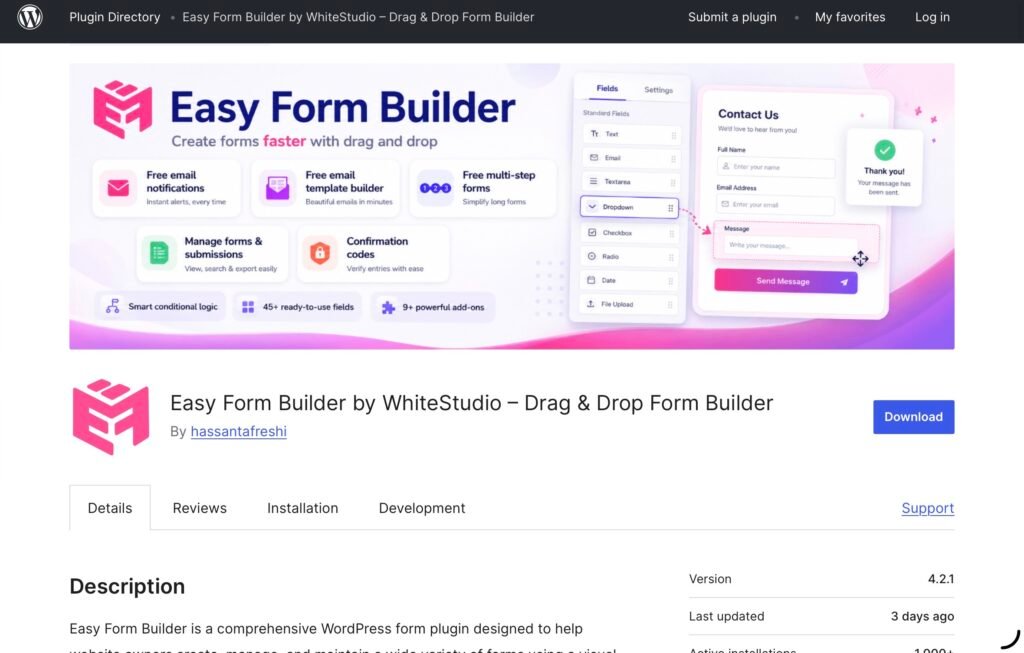
Easy Form Builder is a drag-and-drop WordPress form builder that lets users create contact forms, surveys, registrations, multi-step forms, payment forms, and more without writing code.
You can start with a blank form or a template, add fields, organize them into steps, configure validation and behavior, and then embed the finished form into a WordPress page. The plugin also provides a dashboard for managing submissions.
The range of supported use cases is broader than a standard contact form. You can create:
- Contact forms
- Support request forms
- Surveys and feedback forms
- Job application forms
- Event registration forms
- Reservation and booking forms
- Quote request forms
- Order forms
- Payment forms
- Login and registration forms
- File upload forms
- Multi-step forms
- Conditional forms
- Electronic signature forms
- Audio, video, and screen-recording forms
The plugin currently has 1,000+ active installations and a 5.0/5 rating from 68 reviews on WordPress.org, based on information checked on September 4, 2026.
Getting Started: How Easy Form Builder Works
The setup is fairly conventional for a WordPress plugin: install Easy Form Builder from the WordPress plugin directory, activate it, and a dedicated Easy Form Builder section becomes available in the WordPress dashboard.
From there, the workflow is centered around creating a form rather than configuring a long series of disconnected settings.
The official builder supports templates for common use cases, while the blank form option gives you more control from the beginning. The current interface supports dozens of field types, and forms can be embedded through WordPress as well as popular page builders such as Elementor, Gutenberg, WPBakery, and Visual Composer.
One practical feature is the builder’s autosave functionality, which helps protect longer forms from accidental navigation, browser interruptions, or unsaved changes. Losing a partially configured form because of an accidental navigation or interrupted session is one of those small problems that can make form-building frustrating, so autosave is a welcome addition.
For step-by-step setup instructions and feature guides see the Easy Form Builder documentation.
What Is the Easy Form Builder Interface Like?
The main attraction of Easy Form Builder is its visual workflow.
Instead of editing form markup, you add fields to the form and configure their properties through the builder. That makes the basic creation process approachable even if you are not comfortable with HTML or PHP.
For a straightforward contact form, there is little reason to overcomplicate the setup: add the necessary fields, configure the notification, preview the form, and embed it.
The experience becomes more useful when you start experimenting with different field types.
Easy Form Builder supports fields for:
- File uploads
- Signatures
- Location selection
- Telephone numbers
- Country, state, and city selectors
- Ratings and stars
- Range sliders
- Switches and toggles
- Date pickers
- Matrix and table fields
- Multiple-selection dropdowns
There are also audio, video, and screen-recording fields. These are unusual additions for a WordPress form builder and make the plugin suitable for use cases such as technical support forms, video testimonials, or applications where visitors need to provide more than written information.
The builder also supports multi-step forms, which can be useful when a form contains many questions. Rather than presenting everything on one long page, you can divide the form into logical sections.
What Do You Get With Easy Form Builder Free and Free Plus?

One of Easy Form Builder’s strongest advantages is the amount of functionality available before users need to purchase a paid license.
The Free version includes the core drag-and-drop builder, essential fields, unlimited forms and entries, email notifications, confirmation codes, file uploads, entry management, multi-step forms, and basic survey functionality.
The Free Plus version adds a larger set of advanced tools at no cost. These include advanced fields, audio/video/screen-recording fields, conditional logic, CSV export, PDF downloads, and email deliverability reporting. The main trade-off is a small “Powered by Easy Form Builder” credit on the page where the form is published.
That makes the free offering particularly interesting for small businesses, bloggers, freelancers, and personal websites that need more than a basic contact form but do not necessarily want to pay for advanced functionality immediately.
Conditional Logic: One of the Stronger Features
Conditional logic is one area where Easy Form Builder feels more like a workflow tool than a basic form plugin.
The idea is simple: instead of displaying every field to every visitor, the form changes according to the user’s answers.
For example, imagine a service request form that begins with:
What type of service are you interested in?
If the visitor selects SEO, the form can display SEO-specific questions. If they choose another service, the form can display a different set of fields.
Easy Form Builder’s visual conditional logic builder allows fields and steps to be shown or hidden, fields to become required or optional dynamically, values to be set or cleared, and visitors to be sent to specific steps. Conditional email notifications can also route submissions to different recipients.
Conditional Logic Test Mode allows administrators to verify whether rules are matched, unmatched, or skipped before publishing a form. This is especially useful for forms with multiple branches or dependencies, where a configuration error could otherwise affect the user journey. The official documentation shows the process as an IF/THEN rule builder followed by Test Mode, where matched, unmatched, and skipped rules can be checked.
Free Plus includes up to three logic rules per form, two conditions per rule, and two conditional email notification rules. Pro removes those limits and adds features such as nested AND/OR groups, calculations, conditional redirects, webhooks, rule priority, and a logic Inspector.

How Easy Form Builder Tests WordPress Email Deliverability
Email delivery is one of the easiest parts of a WordPress form to overlook.
A form can submit successfully while the administrator’s notification never reaches the inbox. Hosting configuration, authentication, spam filtering, and DNS settings can all contribute to delivery problems.
One of Easy Form Builder’s clearest differentiators is its built-in email deliverability testing and monitoring system, which addresses a common problem with WordPress forms: a successful submission does not necessarily mean the notification email reached its destination.
The plugin can send a real test email through the website’s mail system and check delivery rather than simply confirming that WordPress attempted to send the message. The report can include a deliverability score, spam score, SPF/DKIM/DMARC checks, delivery information, and recommendations for resolving potential issues.
The dashboard also provides information about sent and failed emails and an Email Error Log. Free Plus includes an automated weekly email deliverability report.
This is one of the features that makes the plugin particularly interesting for lead-generation and support websites. For these sites, knowing that a form was submitted is only useful if the notification reaches the person responsible for responding.
Email Template Editor
Easy Form Builder also includes a visual email template editor.
Rather than manually editing HTML, administrators can customize the emails generated after a form submission. This can be useful when different forms need different notification structures.
For example, a job application can use one email format, while a customer support request can use another.
Custom email templates are included in the free offering, which gives Easy Form Builder an advantage over plugins that reserve basic notification customization for paid plans.
Managing Form Submissions
A form builder is only as useful as its submission management.
Easy Form Builder stores submissions in the site’s WordPress database and provides a dashboard for viewing and managing entries. Administrators can review submissions, use confirmation codes to identify individual requests, respond from the dashboard, and attach files to replies.
The confirmation code system is particularly useful for support or application forms. Each submission receives a unique tracking ID, giving administrators and users a simple reference for a particular request.
Entries can also be exported as CSV files or downloaded as PDFs, depending on the feature set being used.
A notable privacy and data-ownership feature is that Easy Form Builder stores form submissions and messages locally in the site’s WordPress database by default rather than sending them to an external Easy Form Builder server.
Of course, website owners are still responsible for their own hosting security, access controls, privacy policies, and any third-party integrations they activate.
Can Easy Form Builder Accept Payments?
Yes. Easy Form Builder supports payment-related forms through integrations such as Stripe and PayPal, allowing websites to collect payments for bookings, services, donations, orders, and other transactions.
This can be useful for a small business that occasionally needs to collect payments without building a complete e-commerce store.
However, a form builder should not be confused with a full e-commerce platform. If you need inventory management, shipping, large product catalogs, or complex order management, a dedicated e-commerce solution such as WooCommerce will still make more sense.
Audio, Video, and Screen Recording: A Standout Feature
One of Easy Form Builder’s more unusual features is its browser-based recording functionality.
The plugin supports audio, video, and screen-recording fields. That opens up use cases that traditional form builders don’t always address.
For example, a technical support form could let a customer submit a screen recording showing a problem. A recruitment form could request a short video introduction, while a company collecting testimonials could allow customers to record their feedback directly through the form.
These capabilities are not necessary for every website, but they help explain why Easy Form Builder is positioned as more than a standard contact-form plugin.
Integrations and Add-ons
Easy Form Builder offers several integrations that expand what can happen after a form is submitted.
Depending on the plan, these include:
- Stripe
- PayPal
- SMS notifications
- Telegram notifications
- Google Sheets
- Webhooks
- Auto-populate/API integrations
- Offline forms
- Security and spam protection
- Additional date-picker options
The Google Sheets integration is particularly useful for teams that already use spreadsheets as part of their workflow. Form submissions can be synchronized directly with Google Sheets without requiring Zapier or another automation platform.
The Auto-Populate integration can also retrieve information from external APIs and map returned data to form fields, making it possible to build more sophisticated workflows.
Does Easy Form Builder Support Multilingual and RTL Websites?
Easy Form Builder supports multiple languages and includes locale-aware confirmation codes.
The plugin currently lists support for languages including Arabic, Danish, Dutch, English, French, German, Hindi, Persian, Portuguese, and Russian. Its confirmation-code system can also use characters from a much wider range of writing systems, including Armenian, Arabic, Chinese, Japanese, Korean, Georgian, and others.
For multilingual or RTL websites, this can be a useful detail that is easy to overlook when comparing form plugins.
Easy Form Builder vs. WPForms vs. Fluent Forms vs. Forminator
Easy Form Builder is entering a category with several well-established competitors. Comparing the free offerings helps put its feature set into perspective.
| Feature | Easy Form Builder | WPForms | Fluent Forms | Forminator |
| Free version | Yes | Yes | Yes | Yes |
| Conditional logic in free version | Yes, Free Plus with limits | No, generally Pro | Yes | Yes |
| Multi-step forms in free version | Yes | Limited/Pro | Pro | Yes |
| Advanced fields | Free Plus | Some fields free; many advanced features paid | Yes | Yes |
| Email notifications | Yes | Yes | Yes | Yes |
| Email diagnostics/delivery monitoring | Built in | Not a comparable core feature | Standard email tools | Email troubleshooting/logging available |
| Payment forms | Pro/add-ons | Available, depending on integration/plan | Free Stripe/payment functionality | Available |
| Google Sheets integration | Pro/add-on | Available through integrations | Available through integrations | Yes |
| Drag-and-drop builder | Yes | Yes | Yes | Yes |
The comparison is especially interesting around conditional logic. WPForms positions conditional logic and multi-page forms among its broader feature set, while its WordPress.org listing identifies features such as multi-page forms, file uploads, and conditional logic as part of WPForms Pro.
Fluent Forms, meanwhile, includes conditional logic in its free version and offers a broad selection of free fields and integrations.
Forminator is another strong free competitor. Its documentation shows support for conditional field visibility, conditional submission behavior, multi-page forms, email routing, and numerous integrations.
That means Easy Form Builder’s strongest differentiator isn’t simply having a drag-and-drop builder. Several competitors already do that. Instead, the combination of free conditional logic, extensive free fields, local entry management, and built-in email deliverability diagnostics is what makes it worth considering.
What Could Be Improved?
The biggest drawback we found is not a missing headline feature but the breadth of the plugin itself.
Easy Form Builder has a lot packed into one product. A user who only wants a simple contact form may encounter settings and capabilities they don’t need.
This becomes more noticeable once you move from basic fields into conditional logic, advanced fields, integrations, payments, and email configuration. The plugin can do considerably more than a basic form builder, but users may need some time to understand which tools are relevant to their particular workflow.
The Free Plus structure is generous, but the limits become important for more complex forms. Three conditional rules per form may be enough for a simple lead form, but larger workflows will eventually require Pro.
Another consideration is that payment integrations and several business-oriented integrations are not included in Free Plus. Users should therefore compare the specific add-ons they need rather than choosing a plan based only on the headline feature count.
How Much Does Easy Form Builder Cost?
Easy Form Builder offers Free and Free Plus options. As of September 2026, its paid plans include Basic, Premium, and Agency licenses.
The current official pricing page lists Basic at $27/year, Premium at $39/year, and Agency at $199/year, although pricing and promotions can change.
For WPGlob readers, there is also an exclusive WPGlob64 promotional code that gives 64% off Easy Form Builder packages for the first year.
Use code: WPGlob64
Promotional availability and expiration terms should be checked at the time of purchase, as offers can change.
Pros
- Visual drag-and-drop form builder
- Generous Free and Free Plus feature set
- Conditional logic available in Free Plus
- Multi-step forms
- Advanced fields and media-recording fields
- Built-in form submission management
- Custom visual email templates
- Built-in email deliverability testing and diagnostics
- Confirmation codes for submissions
- CSV and PDF export
- Stripe and PayPal support in paid plans
- Google Sheets and other integrations
- Multilingual and RTL support
- Form data stored in WordPress by default
- Autosave for form creation
- Extensive documentation
Cons
- The large feature set can make the plugin feel more complex than necessary for very simple forms
- Free Plus conditional logic has limits of three rules per form
- Payment and several business integrations require a paid plan
- Advanced workflows require more configuration than a basic contact form
Final Verdict: Is Easy Form Builder Worth Trying?
Easy Form Builder is a surprisingly feature-rich option for anyone looking for a WordPress form builder that can grow beyond basic contact forms.
Its biggest strength is not any single field or integration. It is the combination of a visual builder, submission management, conditional logic, multi-step forms, advanced fields, customizable email templates, and email deliverability diagnostics.
The email testing system is particularly useful because it addresses a real problem rather than simply adding another form-building option. Being able to test actual email delivery and inspect information such as SPF, DKIM, DMARC, spam scoring, and delivery status gives administrators more visibility into what happens after someone clicks Submit.
The Free Plus offering is one of the plugin’s strongest value proportions, providing conditional logic, advanced fields, media-recording fields, CSV/PDF exports, and email deliverability reporting without requiring an immediate paid upgrade.
That said, users who only need a basic contact form may find the broader feature set unnecessary. And if you need a highly established ecosystem with thousands of integrations, templates, and third-party resources, competitors such as WPForms, Fluent Forms, and Forminator remain strong alternatives.
For small businesses, agencies, service websites, support teams, multilingual websites, and anyone who needs more sophisticated WordPress forms without immediately paying for every advanced feature, Easy Form Builder is worth trying.
The combination of its free feature set and more advanced workflow capabilities makes it one of the more interesting WordPress form builders to explore — particularly if conditional logic and email reliability are important to your website.
Frequently Asked Questions About Easy Form Builder
Is Easy Form Builder free?
Yes. Easy Form Builder offers both Free and Free Plus options, with additional features available through paid plans and add-ons.
Does Easy Form Builder support conditional logic?
Yes. Conditional logic is available through Free Plus with limits, while Pro provides more advanced and unrestricted workflow options.
Can Easy Form Builder create multi-step forms?
Yes. Easy Form Builder supports multi-step forms for breaking longer forms into smaller, more manageable sections.
Does Easy Form Builder support payments?
Yes. Payment functionality is available through integrations such as Stripe and PayPal.
Where does Easy Form Builder store form submissions?
By default, form submissions are stored locally in the WordPress website’s database rather than being sent to an Easy Form Builder external server.
Is Easy Form Builder better than WPForms?
It depends on the use case. Easy Form Builder may be more attractive to users who value its Free Plus features, conditional logic, media-recording fields, and email deliverability tools, while WPForms has a much larger ecosystem and user base.
Click here for more.