In the world of thousands of WordPress plugins where each competes for attention, getting visibility is one of the biggest challenges developers face and learning about SEO tips for WordPress developers becomes a necessity.
Unfortunately, even with a flawless and feature-rich plugin, developers’ success depends on WordPress plugin SEO.
So, it is time to find your perfect SEO strategy for WordPress plugins.
Optimize WordPress plugin listing and rank your plugin higher on the WordPress directory search results. Furthermore, the improved WordPress plugin ranking will increase downloads, improve user trust, and establish your plugin as a reliable solution in its niche. In this step-by-step guide, you’ll learn how to build a powerful SEO strategy for increasing the visibility of your WordPress plugin. Thus, keep reading and find everything about WordPress plugin promotion from keyword research and readme optimization to backlink generation and behavioral ranking factors.
How WordPress.org Search Actually Works: SEO tips for WordPress developers
It’s simple, when a customer searches for a certain plugin on WordPress platform or via the plugin directory. Moreover, algorithm decides which plugin to appear first. Unlike Google’s algorithm, the WordPress.org search engine relies only on structure, keyword relevance, and user behavior.
So let’s see what step to take for better WordPress plugin SEO marketing.
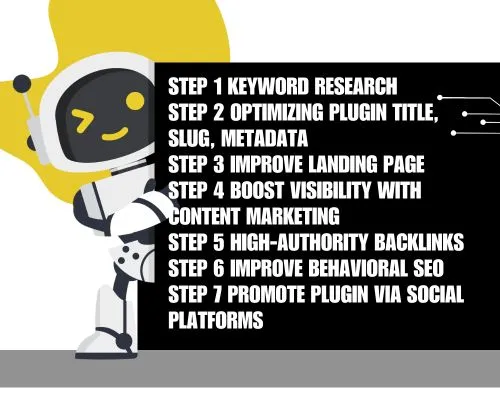
Step 1 Keyword Research for Your WordPress Plugin
It is an undeniable fact that keywords are the backbone for the WordPress plugin SEO. Keyword research is the most required part for a strong SEO. Furhtermore, you need research and find out the terms/words that users actually are searching for both inside WordPress and on Google digital platforms. The keyword research is vital for both optimizing your plugin’s ranking on the WordPress plugin directory and for any other content you generate to promote it.
Now you are probably thinking of how to properly conduct keyword research for your WordPress plugin?
- Understand Your Plugin’s Main Functionality
It is important to clearly describe what your plugin does and the problems it solves for users. Hence, all this will shape and serve as the basis for your initial keyword concept.
- Think of Seed Keywords
At this point you will need to think of the most obvious and broad terms consumers may search for. For example, if your plugin provides SEO features, “seed” keywords can include “WordPress SEO,” “SEO plugin,” or “website optimization.”
- Utilize Keyword Research Tools
Make WordPress plugin directory research to see what terms are already being utilized and what related suggestions appear.
Use Keyword Research Tools. There are tons of keyword research tools such as Ahrefs, Semrush, Moz Keyword Explorer, also, there are free options like Google Keyword Planner. Hence, all of these tools will provide valuable data on search volume and matching keywords. Besides these you can also use WordPress SEO Plugins that can provide you with relevant keywords.
- Analyze Competitor Keywords
This type of keyword research is one of the essentials. It is necessary to explore the keywords already used by successful competing plugins. Examine and reveal valuable insights that will fit your target audience.
- Consider User Intent
Categorize keywords based on the user’s intent, such as Informational, Navigational, Commercial and Transactional.
- Emphasize Keywords
Estimate your plugin’s keywords based on relevance, competition and search value. Also, remember to focus on terms that are the most relevant to your plugin and have a sufficient search volume.
- Identify Long-Tail Keywords
This type of keywords are more particular. Long-Tail keywords include multi-word phrases that tend to have lower search values but higher conversion potential. beginners.”
- Integrate Keywords Strategically
Last but not least important point to take is the right and strategic integrations of your already researched keywords. Insert the keywords in title and description, content and documentation, and more.
Step 2 Optimizing Your Plugin Title, Slug, and Metadata
It is a fact that your WordPress plugin’s title is the most authoritative SEO element. Hence, it has to be illustrative SEO tips for WordPress developers and keyword-rich. Make sure to include your primary keyword naturally to the plugin’s title.
The WordPress plugin slug is also important. Be assured that, once you have set the slug, it should not be changed. Thus, keep your plugin’s slug short, keyword-focused and clear.
What refers to the plugin’s description, it showcases at the top of your plugin listing. So, it is important to make it captivating, influential and attractive. Furthermore, always, insert the main keyword in the first sentence. Moreover, the description should be focused on the main benefits of the plugin. Keep it readable and user-oriented.
Step 3 Improve Your WordPress Plugin Landing Page
Once you have made a proper keyword research, put a strong keyword to your plugin’s title and give it a bold slug with a compelling description users will start to click your plugin.
Therefore, your next step will be to convince them to download the plugin. Thus, your landing page needs to be properly optimized for conversions and SEO.
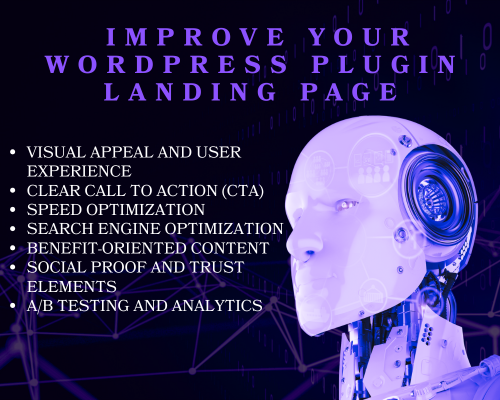
Having a user-friendly landing page is a must and to do that you will need to:
Visual Appeal and User Experience
Use only high-quality images, screenshots, or videos that will showcase the plugin in action. A photo enhancer can help improve clarity, lighting, and sharpness so visuals look professional and polished across all devices. Enhanced images make it easier for users to understand the plugin’s value at a glance.
Be attentive to your page’s responsiveness and make it display well on all the types of devices.
Clear Call to Action (CTA)
Put a single but promotional and strong CTA that will stand out and clearly instruct visitors on the required action (for example, “Download Now,” “Learn More,” “Get Started”).
Please note, to place your CTA strategically.
Speed Optimization
Fast loading pages mean satisfied customers. Therefore, always optimize your web images and code to provide fast loading times, as your page’s speed significantly impacts user experience and SEO. Moreover, you can utilize caching tools and content delivery networks (CDNs).
Search Engine Optimization (SEO)
As I’ve already mentioned, conduct keyword research and insert all of the relevant keywords naturally into the headline, content, meta description, and more. Furthermore, always keep the heading structure (H1, H2, etc.).
Benefit-Oriented Content
Provide your web visitors with benefits-focused content. Also, tell them all of the benefits users will gain from the plugin, rather than just listing features.
Make your content engaging, use easy-to-digest language and bullet points to highlight key advantages.
Demonstrate potential pain points and demonstrate how the plugin solves them.
Social Proof and Trust Elements
For your future users it will be better to see trust elements. Show your plugin’s testimonials, reviews, or case studies to build customer trust.
Present the logos of popular companies or websites that are using your plugin, if applicable.
In additon, do not forget to highlight any awards or positive media mentions.
A/B Testing and Analytics
This step is also important to make. Continuously test various headlines, CTAs, layouts, and content variations to find what resonates better with your audience.
Utilize and constantly track performance using AI search analytics tools to understand your user behavior and conversion rates.
Step 4 SEO tips for WordPress developers: Boost Plugin Visibility With High-Quality Content Marketing
Your next step will be to build a strong Content marketing to grow your plugin downloads organically. Publish tutorials on your blog, write comparison posts, write guest posts on the best WordPress plugin blog, blogspost case studies showing performance improvements. Furthermore, create video tutorials on WordPress plugin YouTube blog, please note, that videos often rank above blog posts.
Here you can find everything about Proven Content Marketing Strategies.
Each of this piece of content gives new SEO pathways that will everytime lead consumers back to your plugin.
Step 5 SEO tips for WordPress developers: Build High-Authority Backlinks to Your Plugin
Remember, backlinks are necessary for ranking your plugin higher on Google and boosting plugin trust, and using a Link Checker Tool helps ensure those backlinks remain active, relevant, and high quality. To do that you need to reach out to WordPress plugins blog for reviews and request mentions in roundup articles (e.g., “Best WordPress plugins for X”).
Do not forget quality beats quantity.
Step 6 Improve User Engagement Signals or Behavioral SEO
It is a fact that user behavior strongly influences how the WordPress algorithm will rank your plugin.
What Your Plugin Needs
- High activation rates
- Frequent use
- Good retention
- Positive ratings
How to Improve Behavioral Metrics?
- Make sure onboarding is effortless.
- Provide in-dashboard help or tooltips.
- Offer pre-built templates or default settings.
- Encourage users to leave reviews.
- Update your plugin regularly with meaningful improvements.
Once again, a WP plugin that users after the activation keep it installed will rise higher in rankings.
Step 7 Promote Your Plugin Through Social and Community Platforms
Remember, visibility does not end with plain SEO. Utilize additional channels to drive traffic and build awareness.
Ready to skyrocket your WordPress plugin’s visibility?
WPGlob is the only marketing agency fully dedicated to WordPress plugins, offering SEO-optimized reviews, content marketing, video promotions, and tailored growth strategies.
Let the experts show you how to reach more users, boost engagement, and increase downloads.
Don’t let your plugin stay hidden WPGlob will make sure your promotional posts focus on value – not selling.
To Sum It Up..
Improving the visibility of your WordPress plugin is not a one-time duty, it’s an ongoing strategy. By understanding how WordPress.org rankings work and applying strong SEO strategies included in this article, your plugin will stand out, gain more active installs, and earn long-lasting credibility.