Choosing the right website translation platform can make a major difference for businesses that want to expand into international markets. A multilingual website is no longer simply about translating text from one language into another. Businesses also need to consider SEO, content synchronization, URL structures, ecommerce compatibility, translation management, and the cost of maintaining multiple language versions.
Two platforms that take different approaches to this challenge are Clonable and Weglot. Both can automate website translation and help businesses create multilingual websites, but their pricing models and workflows are quite different.
Clonable takes an interesting approach. With Clonable you keep your existing site structure and get a fully localized copy per market without rebuilding. Its pricing is primarily based on the number of translated pages and clones, and it also offers dedicated ecommerce plans for platforms such as WooCommerce, Magento, and Shopware.
Weglot, meanwhile, is a broader website localization platform built around translated word counts and target languages. It combines AI translation with manual editing, translation memory, glossary rules, and professional translation options.
So, which platform is better? The answer depends largely on the size and type of your website, the amount of content you need to translate, and how much control you want over the translation process.
Clonable VS Weglot: At a Glance
| Feature | Clonable | Weglot |
| Main approach | Website cloning and market-specific localization | Website translation and localization |
| Pricing model | Primarily based on translated pages and clones | Based on translated words and languages |
| XML feed translation | Yes, useful for localizing ecommerce product feeds | Not a primary focus |
| Ecommerce plans | Dedicated Small, Medium, and Large ecommerce plans | Ecommerce support through integrations |
| Market-specific content | Designed to create localized versions with market-specific adaptations | Supports localized translations within a shared site structure |
| URL structure | Supports subfolders, subdomains, and separate domains for market versions | Primarily uses subdirectories for translated versions |
| Media replacement | Supports replacing images and other media by language/market | More focused on translating website content |
| Content synchronization | Keeps localized versions synchronized with the source website | Automatically updates translations when source content changes |
| Site search | Can localize search-related content for individual markets | Supports translated website content and search-related elements |
| AI translation | Yes | Yes |
| Translation editing | Yes | Yes |
| Translation rules | Yes | Yes |
| Multilingual SEO | Yes | Yes |
| WordPress | Supported | Supported |
| WooCommerce | Dedicated ecommerce plans | Supported |
| Large ecommerce catalogs | Well suited to multi-market catalogs and frequent product updates | Suitable for large catalogs, with costs tied to translated word volume |
| Starting paid price | €49/month (Business), free plan available | €15/month |
What Is Clonable?
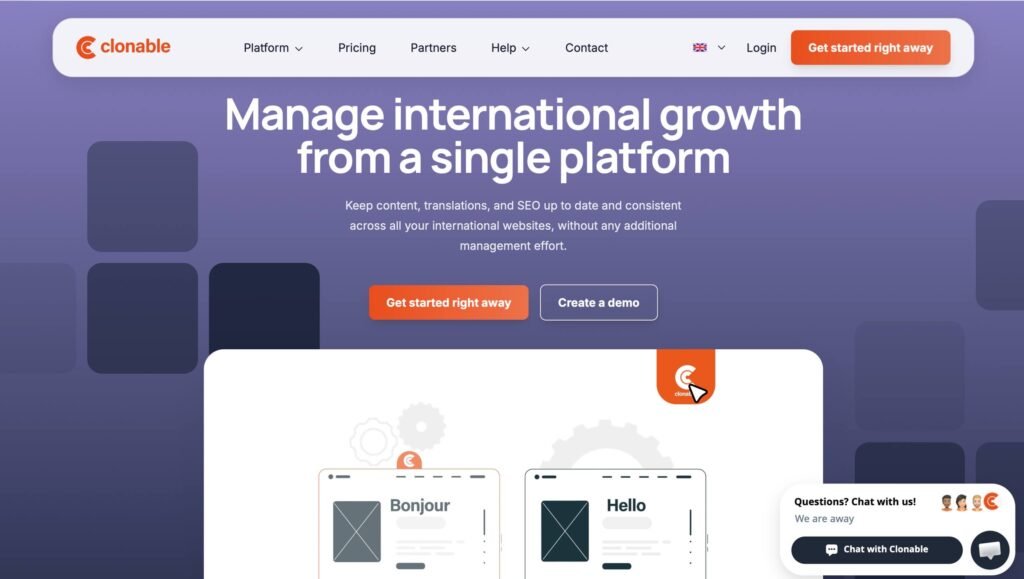
Clonable is a website translation and localization platform built around a simple idea: instead of creating every language version of your website from scratch, you can create a translated “clone” of the original site.
This approach works well if you already have a website and want to adapt it for new markets. Clonable keeps the existing structure while handling translation and localization. When you update a product description or publish a new page, changes can be automatically synchronized across localized versions, while local teams can still make market-specific adjustments when needed. This makes managing multiple markets simpler without having to update each version manually.
One of the things that makes Clonable stand out is its page-based pricing structure. Rather than asking you to estimate how many words your entire website contains, Clonable focuses on the number of translated pages and clones you need.
For example, the Business plan includes up to 400 translated pages and three clones, while Pro supports up to 1,200 pages and five clones. Expert increases this to 5,000 pages and ten clones, while Premium supports up to 50,000 translated pages and 20 clones.
I find this model particularly practical for websites where the number of pages is easier to understand than the total number of words. You can look at your website, estimate how many pages need localization, and use that number as the starting point for planning your setup.
Clonable also offers dedicated ecommerce packages. Ecommerce Small supports up to 1,000 translated pages, Ecommerce Medium up to 5,000, and Ecommerce Large up to 15,000. These plans are designed for online stores and support platforms including WooCommerce, Magento, Shopware, and custom ecommerce systems.
For larger stores, this is one of the areas where Clonable becomes especially interesting. If your store has thousands of product pages, thinking in terms of pages rather than words can make the localization process feel much more straightforward.
What Is Weglot?
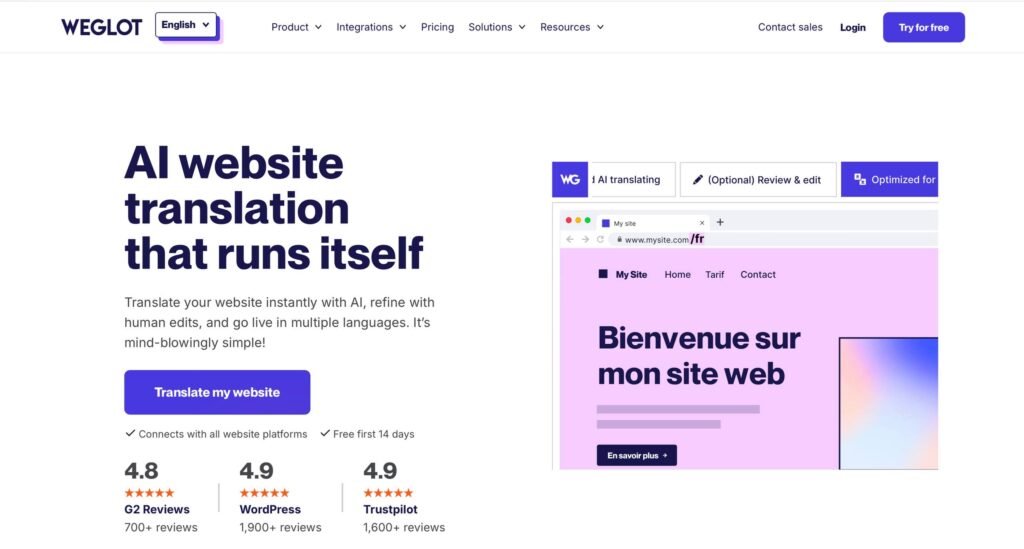
Weglot is a website translation platform that helps businesses create and manage multilingual websites. It automatically detects website content, translates it using AI, and publishes localized versions in different languages. Users can review and edit translations through its dashboard and Visual Editor, making it easier to manage multilingual content without rebuilding the website.
Weglot is also designed to work with a wide range of website technologies. It offers integrations for WordPress, Shopify, Webflow, Squarespace, BigCommerce, and other platforms, while also supporting custom websites through its JavaScript integration.
This makes Weglot particularly attractive to businesses that want a relatively quick way to turn an existing website into a multilingual site without rebuilding the website for every language.
Features: Clonable VS Weglot
1. AI Translation
Both platforms use AI-based translation to automate much of the translation process.
With Clonable, you can start with AI translations and then adapt the results to better match your website. Its Context Assistant and Style Prompts add another layer of control by letting businesses provide information about their brand, target audience, and preferred tone of voice. These guidelines help Clonable tailor translations to the brand from the start, reducing the need for extensive editing afterward while keeping localized content consistent across markets.
Weglot offers an AI-assisted translation workflow that combines automated translations with options for manual editing and professional translation. Its AI Translation Model can also use brand guidelines, glossary information, and previous edits to help maintain consistency across translated content.
2. Translation Editing
Translation automation is useful, but businesses often need to correct specific terms, product names, marketing messages, or industry-specific language.
Clonable gives you control over translated versions of your website after the initial translation. It provides a glossary and translation exclusions that you can configure before creating a translation to improve accuracy and consistency. You can also edit translations, create translation rules, and exclude specific elements from being translated. Additionally, Clonable offers a visual Clone Editor that allows you to review and edit translations directly within the context of your website. This makes it easier to see how translated content fits into the page and adjust it where necessary. This approach is helpful for businesses that have certain brand names, terminology, or website elements they want to keep consistent across different markets.
Weglot includes a Visual Editor that lets users review translated content directly within the webpage context. This can help teams check elements such as buttons, headings, and other visible content. It also provides translation memory and glossary features to help maintain consistency across multilingual content.
3. Multilingual SEO
SEO is one of the most important considerations when translating a website. Simply displaying translated text to visitors is not enough if search engines cannot properly discover and index the translated pages.
Weglot automatically creates language-specific URLs, adds hreflang tags, translates metadata, and creates multilingual sitemaps. This means businesses can manage many of the technical elements required for international SEO without manually implementing them.
Clonable also provides essential SEO features for localized websites. It creates indexable localized versions of your website, supports hreflang implementation, and allows you to localize SEO elements such as metadata and URLs for each market. You can also use subfolders, subdomains, or separate domains for translated versions, depending on your setup.
Both Clonable and Weglot offer important SEO functionality, including tools to help search engines understand and index localized content. While their approaches and workflows may differ, both provide the core features needed to support international SEO.
4. Ecommerce
For ecommerce websites, translation involves more than translating standard pages. Product catalogs, product feeds, checkout elements, URLs, images, and frequently changing product information can all require localization.
Clonable is particularly useful for ecommerce businesses that need to manage product information across multiple markets. For example, translated XML product feeds can help localize product catalogs for different languages and regions, making it easier to keep product names, descriptions, and other details consistent across stores. This can reduce repetitive manual work for ecommerce teams while helping each market maintain accurate, localized product information as the catalog changes.
Another useful feature is XML product feed translation. Clonable can translate XML product feeds, with pricing starting at €30 per month on Ecommerce Small and increasing to €50 or €75 on the larger plans.
For a store that relies heavily on product feeds, this can be a valuable addition because localization does not stop at the pages customers see directly on the website.
Weglot also supports ecommerce platforms such as Shopify and WooCommerce and can handle product and website content as part of its multilingual workflow.
For businesses with large product catalogs and a strong ecommerce focus, Clonable’s page-based ecommerce plans and product-feed functionality make it particularly compelling.
5. Content Synchronization
A multilingual website becomes difficult to manage when every update has to be repeated manually.
One of the things that makes Clonable practical is its automatic synchronization. When content on the original website changes, the cloned websites can be updated as well. At the same time, you can still make language-specific adjustments when a particular market requires different messaging.
This gives you a useful balance between keeping websites synchronized and allowing localized versions to have their own identity.
Weglot similarly detects new or changed content and translates it automatically. Its continuous translation workflow is designed to keep translated versions synchronized as the original website changes.
Both platforms are strong for businesses that regularly publish or update content.
Pricing Comparison
Pricing is where Clonable and Weglot differ most significantly.
Clonable Pricing
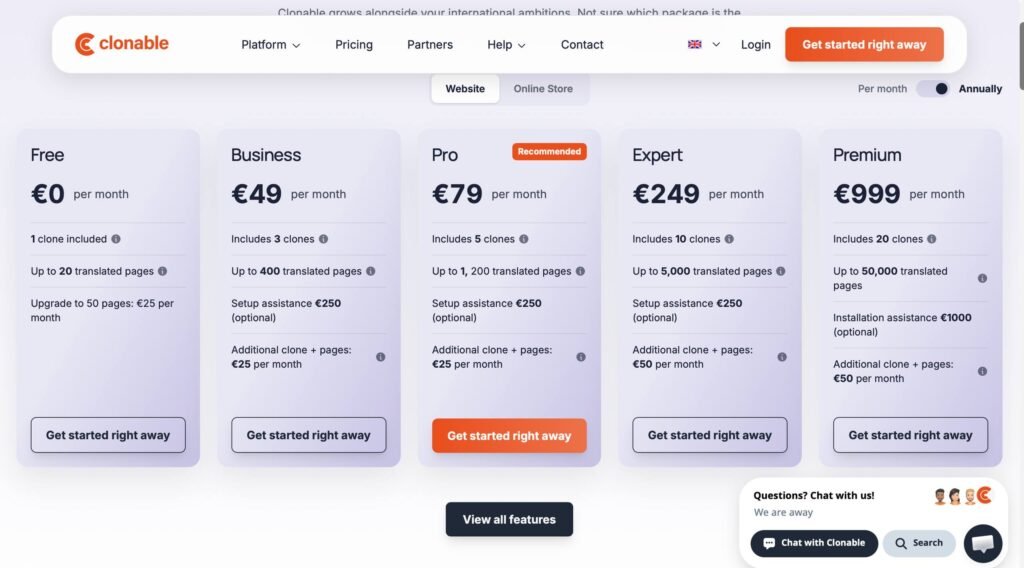
The company offers a free plan as well as Business, Pro, Expert, and Premium plans.
The free option includes one clone and up to 20 translated pages, with a one-time upgrade option to 50 pages.
The standard plans include:
- Free: 1 clone and up to 20 translated pages
- Business: 3 clones and up to 400 translated pages
- Pro: 5 clones and up to 1,200 translated pages
- Expert: 10 clones and up to 5,000 translated pages
- Premium: 20 clones and up to 50,000 translated pages
Additional clones and pages are available for an extra monthly fee. On the Business and Pro plans, an additional clone and pages costs €25 per month, while Expert and Premium charge €50 per month. Optional setup assistance costs €250 on Business, Pro, and Expert, while Premium installation assistance costs €1,000. Clonable also offers annual billing through its pricing options, with the annual rate providing a discount compared with paying month to month.
For ecommerce, Clonable offers separate plans:
- Ecommerce Small: up to 1,000 translated pages
- Ecommerce Medium: up to 5,000 translated pages
- Ecommerce Large: up to 15,000 translated pages
The company also offers a price calculator that takes website size and the number of languages into account.
Clonable’s pricing page lists fixed monthly prices for its plans: Free at €0, Business at €49, Pro at €79, Expert at €249, and Premium at €999 per month. This makes the available pricing tiers straightforward to compare based on the size and localization needs of your website.
Weglot Pricing
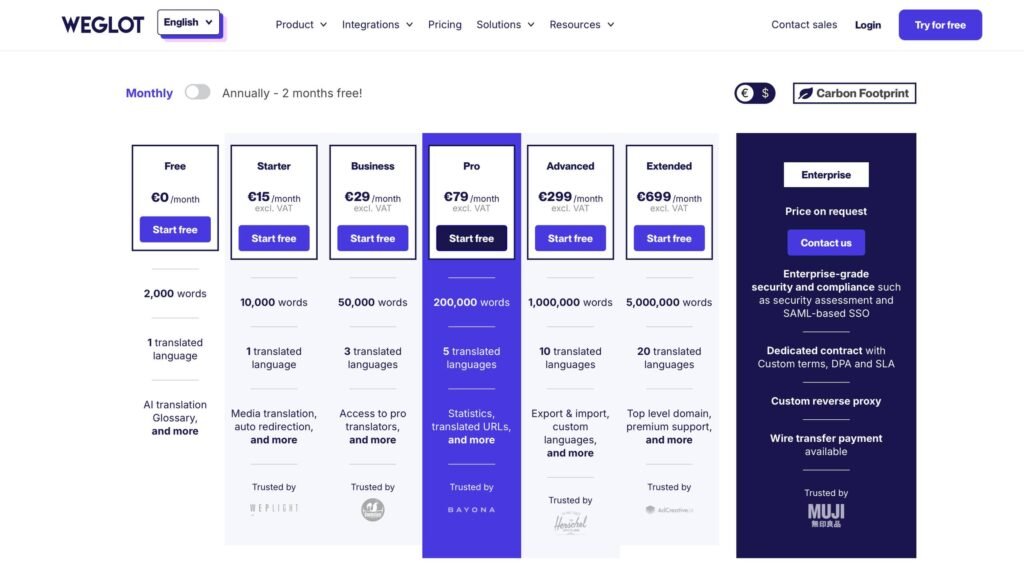
The current plans are:
- Free: €0/month, up to 2,000 translated words and 1 language
- Starter: €15/month, 10,000 words and 1 language
- Business: €29/month, 50,000 words and 3 languages
- Pro: €79/month, 200,000 words and 5 languages
- Advanced: €299/month, 1,000,000 words and 10 languages
- Extended: €699/month, 5,000,000 words and 20 languages
- Enterprise: Custom pricing
The annual prices are lower because Weglot effectively gives two months free on annual billing. For example:
- Starter is €150 per year
- Business is €290
- Pro is €790
- Advanced is €2,990
- Extended is €6,990
All paid plans include a 14-day free trial, while the Free plan can continue after the trial if the project remains within its 2,000-word limit.
Weglot also offers professional translation services, with professional translations starting at €0.13 per word according to its pricing information.
Which Pricing Model Is Better?
The better pricing model depends on the type of website you manage. Clonable charges based on the number of pages rather than the amount of text on each page, so it may be more attractive for websites with many pages that contain relatively large amounts of content. For example, an ecommerce catalog with thousands of product pages can benefit from predictable page-based pricing, as long as the number of pages fits within Clonable’s Fair Use Policy.
Weglot’s word-based pricing may be easier to plan for content-heavy websites where the total amount of translated content is relatively predictable. A company with hundreds of articles and landing pages, for example, can estimate costs based on its overall word count rather than the number of individual pages.
There is also a difference in how the two platforms handle expansion. With Weglot, adding languages affects the number of translated languages included in a plan, while Clonable’s model uses additional clones for different market versions.
Price Comparison
At €79 per month, Clonable’s Pro plan allows you to create up to 1,200 pages across cloned websites, while Weglot’s Pro plan includes 200,000 translated words. These plans use different pricing models: Clonable focuses on the number of pages you can clone, whereas Weglot bases its allowance on translated word count. As a result, the better option depends on your website’s size, content volume, and localization needs.
| Tier | Clonable plan | Clonable per month | Clonable includes | Weglot plan | Weglot per month | Weglot includes |
| Free | Free | €0 | 1 clone, 20 pages | Free | €0 | 1 language, 2,000 words |
| Entry | Business | €49 | 3 clones, 400 pages | Business | €29 | 3 languages, 50,000 words |
| Middle | Pro | €79 | 5 clones, 1,200 pages | Pro | €79 | 5 languages, 200,000 words |
| Large | Expert | €249 | 10 clones, 5,000 pages | Advanced | €299 | 10 languages, 1,000,000 words |
| Top | Premium | €999 | 20 clones, 50,000 pages | Extended | €699 | 20 languages, 5,000,000 words |
Clonable VS Weglot: Final Verdict
Weglot and Clonable are both strong solutions, but they are designed around somewhat different priorities.
Clonable makes the most sense for businesses managing multiple markets that need to keep frequently updated content synchronized while still allowing each market to have its own localized adaptations. It is particularly useful for teams that want to maintain a consistent core website while adjusting content, structure, and messaging to fit different regional audiences.
If your website has a large number of pages and you want to create localized versions without rebuilding the entire site, Clonable offers a practical approach. Its page-based model is also something I would consider when a website’s structure is easier to measure in pages than in words.
Clonable is the stronger choice for businesses that want to localize an entire website for each market, with greater control over site structure and market-specific content.
Weglot is the stronger choice for businesses that want a quick translation setup with a simple workflow and broad integrations.
Neither platform is universally better. The right choice comes down to how your website is structured, how much content you have, how many languages you need, and whether you prefer to budget according to pages or translated words.
Click here for more articles.